Quick Summary
- WhatsApp is Indispensable in Malaysia: It is the undisputed best messaging app for business in the region, boasting massive user adoption, real-time communication speeds, and incredible open rates compared to traditional email.
- Know Your WhatsApp Tiers: The free WhatsApp Business App is great for solo entrepreneurs, but growing teams must upgrade to the WhatsApp Business API to unlock multi-agent access, automation, and advanced analytics.
- Reduce Buyer Friction: Capture leads instantly by installing a WhatsApp Button directly on your website or using a WhatsApp Link Generator for your social media and email campaigns.
- Scale Your Support: Transitioning to a WhatsApp Business multiple users setup allows your entire team to manage tickets simultaneously from a single company number, drastically reducing response times.
- Understand the Costs: While the standard app is free, scaling with the API introduces a conversation-based pricing model, making it crucial to budget for user-initiated vs. business-initiated messages.
Customers in Malaysia expect instant responses when they reach out to their favorite brands. The modern consumer does not want to wait hours for an email reply or sit on hold during a phone call. They want answers immediately. However, managing conversations manually on a standard phone quickly becomes impossible as your company grows. If your team is struggling to keep up with inquiries, manual processes simply will not scale.
The ultimate solution to this problem is whatsapp for business. This is not just a simple messaging app but a comprehensive communication ecosystem designed to help you automate sales, provide instant support, and scale operations effortlessly. Whether you run a bustling local retail shop, an expanding e-commerce empire, or a professional service firm, setting up a whatsapp business account is the foundational step to modernizing your customer interactions.
This comprehensive guide is built specifically for small to medium enterprises, online merchants, and service providers. We will explore how mastering whatsapp business malaysia can transform your operations, save your team countless hours, and keep your customers incredibly satisfied. If you are ready to stop dropping leads and start closing deals faster, read on to master whatsapp for business.
Why WhatsApp is the Best Messaging App for Business in Malaysia
When evaluating communication tools, you might wonder what the best messaging app for business truly is. In Malaysia, the answer is undeniably WhatsApp. With overwhelming market penetration across all demographics, it is the app your customers are already checking dozens of times a day. While platforms like Telegram, WeChat, or Facebook Messenger have their places, none offer the same level of ubiquity and trust in the local market. By building your customer support strategy around the platform your buyers prefer, you create a frictionless, comfortable, and highly responsive support experience that sets your brand apart.
WhatsApp Business vs Personal WhatsApp: What’s the Difference?
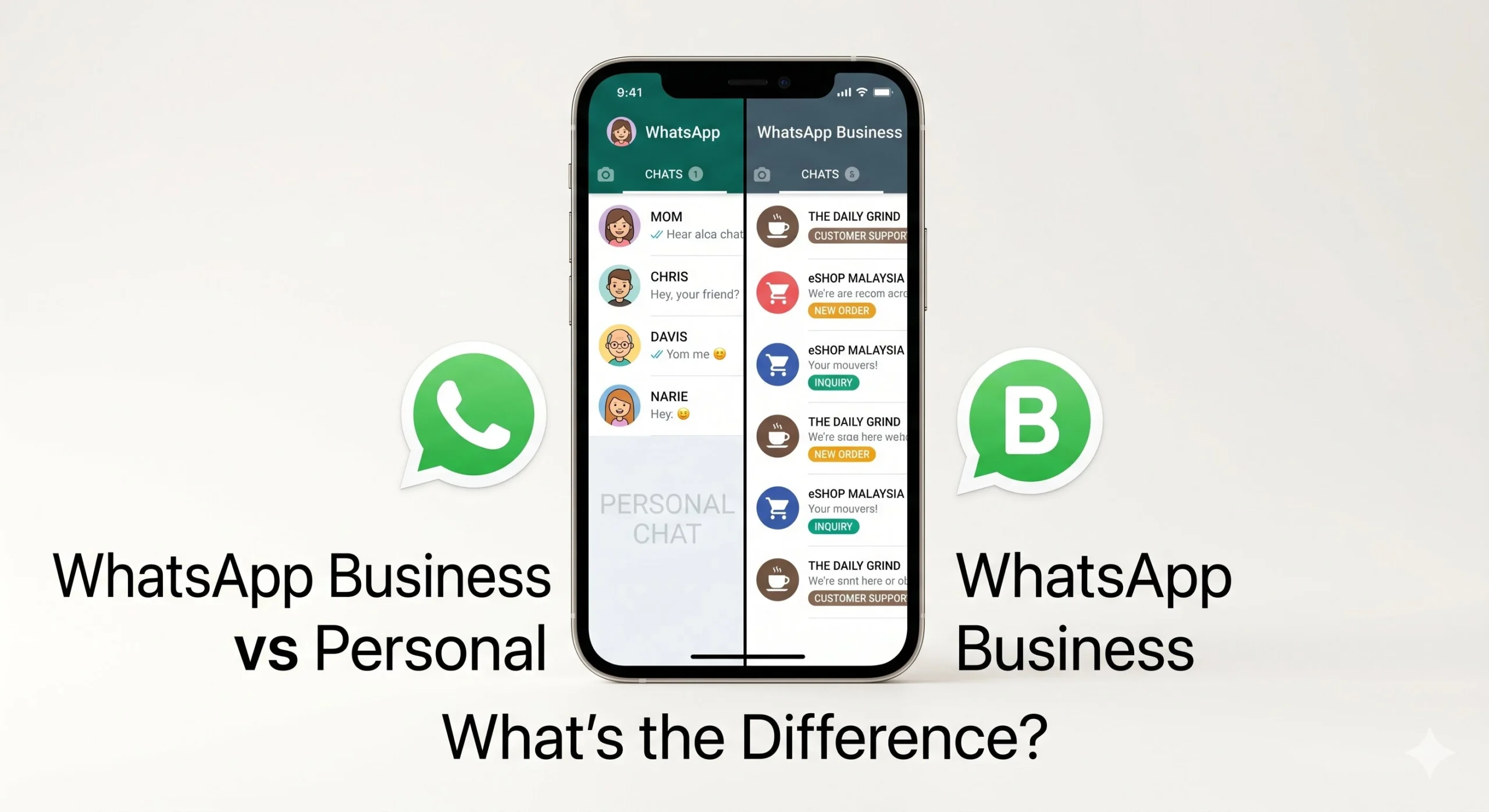
Many new entrepreneurs start by talking to customers on their standard, personal messaging app. Very quickly, they realize this approach is flawed. Understanding the core difference of whatsapp business vs personal is critical for any growing brand. The personal version is built for chatting with friends and family, completely lacking the tools required to run a commercial operation.
When you evaluate whatsapp business vs personal, you will find there are actually three distinct tiers of the application ecosystem. Each tier is built for a different stage of company growth.
| Tier | Best For | Key Limitation |
|---|---|---|
| Personal WhatsApp | Individual daily use | Absolutely no commercial tools |
| WhatsApp Business App | Solopreneurs and micro-brands | Limited to 1 device and 1 agent |
| WhatsApp Business API | Growing teams and larger brands | Unlimited agents and full automation |
If you are a solo operator, the free app is a great starting point. However, as your conversation volume increases, the limitations of the free app become obvious. You cannot have multiple staff members answering tickets simultaneously. For teams that need robust collaboration, you will need to upgrade. You can easily learn more about the WhatsApp Business API Malaysia to see how it solves the multi-user problem. Recognizing the limits of whatsapp business vs personal early on saves you from future operational bottlenecks.
Key Benefits of WhatsApp for Business
Switching to a professional platform unlocks massive advantages for your daily operations. The whatsapp business benefits go far beyond simply having a logo on your profile. Here are the top reasons why transitioning to whatsapp for business is a mandatory move for your company.
Incredible Open Rates Compared to Email
Traditional email marketing often sees open rates hovering around 20 percent. Messages sent through a whatsapp business account boast an astonishing open rate. According to industry data, text-based messaging can achieve open rates as high as 98 percent. You can read more about these statistics in this report on messaging open rates by Gartner. This means your audience actually sees what you send.
Overwhelming Customer Preference
People prefer to chat on platforms they already use daily. By utilizing whatsapp business malaysia, you are meeting your buyers exactly where they are most comfortable. This frictionless experience drastically increases conversion rates.
Real-Time Communication Speeds
One of the most obvious whatsapp business benefits is the speed of interaction. You can answer questions, confirm orders, and resolve complaints in real time. This immediate loop builds immense trust and prevents buyers from abandoning their shopping carts.
Rich Multimedia Support
A major part of understanding how to use whatsapp for business involves leveraging multimedia. You can send product catalogs, PDF invoices, voice notes, and tutorial videos directly in the chat. This rich media capability turns a simple text thread into a highly engaging shopping experience.
Cost Efficiency Over Phone Support
Running a traditional call center is expensive and inefficient. Phone agents can only speak to one person at a time. The whatsapp business benefits shine here, as a single agent can manage multiple chat conversations simultaneously, drastically lowering your customer service overhead costs.
Ability to Automate at Scale
When you upgrade your infrastructure, you can automate repetitive tasks. You can run highly profitable WhatsApp marketing campaigns that trigger automatically based on user behavior. Automation is the key to scaling without aggressively expanding your payroll.
WhatsApp Business Features Every Business Owner Should Know
To maximize your return on investment, you must understand the native whatsapp business features built into the free application. These foundational tools are designed to make your company look professional and respond faster.
The standard app provides a comprehensive Business Profile where you can display your address, website, and operating hours. Another powerful tool is the Catalogue feature, allowing you to showcase your products and services directly within the chat interface. You can neatly organize your ongoing conversations using Labels, ensuring you never lose track of a hot lead or a pending payment. Additionally, the app offers Quick Replies to save your most frequently sent messages, alongside Away Messages to automatically let people know when you are offline.
While these whatsapp business features are fantastic for micro-teams, they eventually hit a ceiling. If you are researching how to use whatsapp for business effectively at scale, you will quickly find the free app lacking. For brands that need more than one agent, advanced automation, and detailed analytics, the WhatsApp Business API unlocks an entirely new level of capability. This API is the robust infrastructure that professional platforms like oChats are built upon.
6 Ways Malaysian Businesses Use WhatsApp
Understanding the theory is helpful, but seeing practical applications is where the true value lies. This section is the core hub for learning exactly how to use whatsapp for business in the real world. Let us explore the four primary ways successful operators in the region utilize whatsapp business malaysia to drive growth.
WhatsApp Customer Support
Handling queries, complaints, and post-sale issues via messaging is incredibly efficient. The business case is clear: buyers resolve their issues much faster, and your support staff can handle significantly more volume compared to answering phone calls.
Imagine a scenario where a buyer messages your company about a delayed shipping order. Instead of waiting on hold, they send a quick text. Your agent instantly pulls up their tracking details and provides a resolution within minutes, turning a frustrated buyer into a loyal advocate.
Read our complete guide to learn exactly how to use WhatsApp for customer support.
WhatsApp Live Chat for Your Website
Embedding a chat button directly on your website allows visitors to start a conversation with just one click. The business case for this is undeniable. It reduces website drop-off rates and rapidly converts casual browsers into qualified leads. According to a study by Forrester on proactive chat, website visitors who use chat are significantly more likely to make a purchase.
Consider a visitor browsing a complex product page on your website. They are confused about the sizing options. They click the floating chat button, ask a quick question, receive an immediate answer, and instantly become a paying customer.
Learn how to set this up by implementing a WhatsApp live chat for your website.
Installing a WhatsApp Button on Your Website
Friction is the enemy of good customer service. If a potential buyer on your website has a question about shipping or sizing, forcing them to hunt for an email address or a phone number will likely cost you the sale. By integrating a WhatsApp Button directly onto your web pages, you provide visitors with an instant, one-click gateway to your support team. This floating widget sits in the corner of the screen, bridging the gap between browsing and buying. It’s an incredibly effective way to proactively offer help and turn casual website traffic into engaged, satisfied customers.
Creating Custom Prompts with a WhatsApp Link Generator
If you run social media ads, send out email newsletters, or have active social media profiles, getting customers into your WhatsApp support channel should be as easy as tapping a screen. A WhatsApp link generator is a free and powerful tool that creates custom “wa.me” links you can embed anywhere. Even better, these tools allow you to pre-fill a custom message. When a user clicks the link, their WhatsApp opens with a drafted message like, “Hi, I need help tracking my latest order,” ready to hit send. This eliminates typing effort for the customer and immediately provides your agents with the context they need to help.
WhatsApp Chatbot for Automated Responses
Using a digital assistant to handle frequently asked questions, qualify new leads, and respond outside of normal operating hours is a game changer. The primary business case here is 24/7 availability, a drastically faster first response time, and a massive reduction in your human agents workload.
Picture a prospect messaging your whatsapp business account at 11:00 PM asking about your enterprise pricing tier. A digital assistant immediately engages them, asks three qualifying questions, and automatically books a callback for your sales team the next morning.
See how this incredible technology works by exploring a WhatsApp chatbot for Malaysian businesses.
WhatsApp Business API for Growing Teams
The API enables features that the standard app simply cannot provide. This includes having multiple agents securely using one single phone number, deep CRM integrations, large scale promotional broadcasts, and comprehensive analytics. The business case is simple: once you outgrow the standard app, the API is the only way to scale your communications without descending into chaos.
Imagine a bustling team of eight support agents. They are all handling customer conversations from a single, unified company number. Every incoming message is assigned automatically to the right department, and management can monitor the entire operation from a central dashboard.
Enabling WhatsApp Business Multiple Users for Support Teams
As your Malaysian business grows, relying on a single smartphone to handle customer support quickly becomes a bottleneck. Customers expect fast replies, but the free WhatsApp Business app restricts you to a limited number of devices. To scale your support operations, you need a WhatsApp Business multiple users setup. By upgrading to the WhatsApp Business API, your entire customer service team can log into a centralized inbox and reply to tickets simultaneously from a single, unified business phone number. This ensures no message slips through the cracks, response times plummet, and your team can collaborate efficiently to resolve complex customer issues.
Get started by unlocking the power of the WhatsApp Business API Malaysia and deploy a powerful multi-agent WhatsApp inbox for your entire team.
Understanding WhatsApp Business API Pricing in Malaysia
When upgrading your support infrastructure, it is crucial to understand how WhatsApp Business API pricing in Malaysia works. Unlike the free app, the API operates on a conversation-based pricing model set by Meta. You are charged per 24-hour conversation window, with rates differing based on who initiates the chat. User-initiated conversations (when a customer messages your support team) are generally cheaper than business-initiated conversations (like marketing broadcasts). Additionally, you will usually pay a monthly subscription fee to your chosen Business Solution Provider (BSP) or omnichannel inbox software to access their dashboard. Budgeting for these costs is an essential step in modernizing your customer service department.
How to Get Started with WhatsApp for Business in Malaysia
Many operators feel overwhelmed when trying to figure out how to use whatsapp for business for the first time. The good news is that the implementation process is highly straightforward. If you want to establish a professional whatsapp business account today, follow this simple and scannable path.
- Download the dedicated application from your app store and meticulously set up your public profile with accurate contact details.
- Define your primary operational use case so you know exactly what you want to achieve, whether that is support, lead generation, marketing, or all three combined.
- Configure your quick replies and out of office away messages to ensure you have basic automation running from day one.
- Upgrade your infrastructure to the professional API when your conversation volume grows and you need to bring multiple staff members into the platform.
Understanding the difference of whatsapp business vs personal early makes this transition seamless. Step four is often where growing brands get stuck. Fortunately, you do not have to build the technical infrastructure yourself. Start your free trial with oChats today, and let our platform handle the complex API integration for you, allowing you to enjoy all the whatsapp business benefits immediately.