Appointment Booking Form: Book Meetings Straight From Chat
Stop losing leads in the back-and-forth of "what time works for you?" oChats lets agents schedule a virtual meeting directly inside the conversation — no switching to a separate calendar app, no chasing a customer for their availability across three different messages.
What Is the Appointment Booking Form?
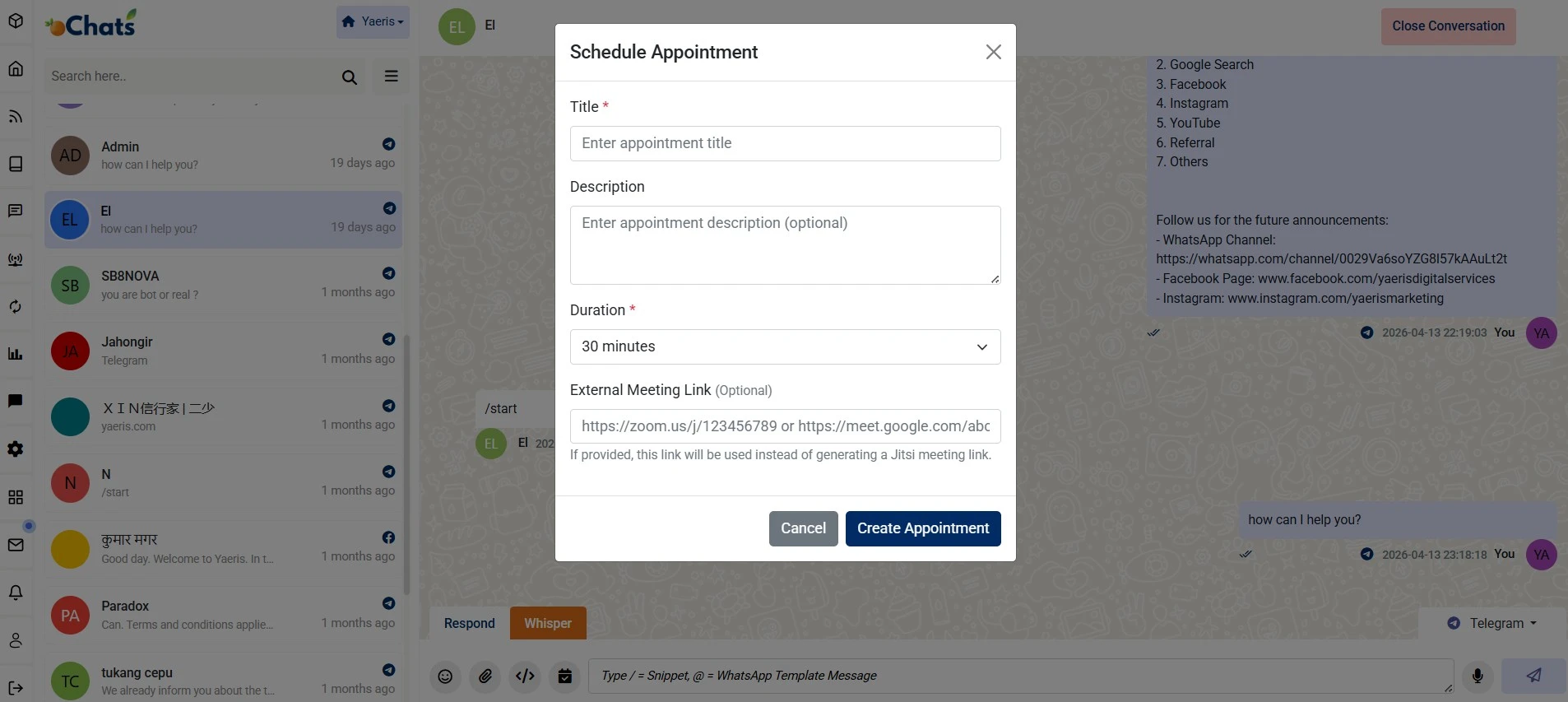
The Appointment Booking Form lets an agent schedule a virtual meeting without leaving the active oChats conversation. Instead of sending a customer to a separate booking page or app, the agent sets up the meeting right inside the chat — converting an inquiry into a confirmed appointment in the same window the conversation is already happening in.
It's included on every oChats plan, and it works the same way regardless of which channel the conversation started on — WhatsApp, Telegram, Facebook Messenger, or any other connected channel — while keeping a centralized record of the appointment in the same unified dashboard as the rest of the conversation history.
What Can You Set Up in Each Booking?
Title & Description
Define a clear title and description for the meeting so both the agent and the customer are aligned on the agenda before it happens.
Flexible Duration
Choose the meeting length from a customizable duration dropdown, so a quick consultation and a longer support session each get the right amount of time.
Built-In Video Link
A Jitsi video meeting link is generated automatically by default — no separate video-conferencing account needed to get a working link.
Or Use Your Own Platform
Prefer Zoom or Google Meet? Add your own link in the External Meeting Link field instead of using the default Jitsi link.
How Does Booking a Meeting From Chat Work?
1. Fill in the appointment details. The agent sets a title, description, and duration for the meeting directly inside the conversation.
2. Choose the video link. Use the automatically generated Jitsi link, or paste in a Zoom or Google Meet link instead.
3. Confirm the appointment. The Create Appointment action finalizes the booking and shares the details with the customer in the same chat thread.
4. It stays in the conversation history. The full appointment record stays attached to that conversation in the unified omnichannel dashboard, not in a separate calendar tool.
Why Book Meetings Inside the Chat Instead of a Separate Tool?
The usual way to schedule a meeting from a sales or support conversation involves several separate steps: asking for availability, sending a booking-page link, waiting for the customer to pick a slot, then sending a calendar invite once it's confirmed. Each step is a place the conversation can stall, or the customer can simply not follow through.
Keeping the booking inside the chat removes that back-and-forth entirely — the agent proposes and confirms the meeting in the same thread the customer is already responding in, with a working video link attached from the moment it's created. That also means the appointment record doesn't live in a disconnected calendar app; it's part of the same conversation history an agent (or their teammate, on a shared inbox) would look at later.
Because it works the same way across every connected channel, a customer who reached out on Facebook Messenger gets the exact same booking experience as one who messaged on WhatsApp — the agent isn't limited to whichever channel happens to have its own native scheduling feature.
Who Uses Appointment Booking Inside oChats?
Sales Consultations
Book a product demo or sales call the moment a lead shows interest, without sending them to book it elsewhere.
Service Businesses
Clinics, consultants, and agencies can confirm a client meeting time directly from the same WhatsApp thread the inquiry came in on.
Support Escalations
When a support issue needs a live conversation instead of more back-and-forth messaging, book a call in the same thread.
Onboarding Calls
Schedule a new customer's onboarding session right after they sign up, keeping the whole relationship in one conversation history.
Booking From Chat vs. a Separate Booking Page
Sending a customer to a separate booking-page link works, but it means the conversation and the appointment live in two different places — and the agent has no way to know a slot was actually booked without checking a different tool.
| Capability | Separate Booking Page/App | oChats Appointment Booking Form |
|---|---|---|
| Customer stays in the same chat | No — redirected to another site | Yes |
| Video link included automatically | Depends on the tool | Yes — Jitsi by default |
| Own video platform (Zoom/Google Meet) | Depends on the tool | Yes — External Meeting Link field |
| Appointment record tied to the conversation | No — separate system | Yes — same unified dashboard |
| Works the same across every channel | Depends on the tool's own integrations | Yes — WhatsApp, Telegram, Facebook, and more |
Looking for the Rest of the Support Toolkit?
The Appointment Booking Form is one part of oChats' broader helpdesk toolkit. For ticket management, SLA-free escalation rules, and the full support workflow, see the helpdesk ticketing system overview. For how conversations and contacts are managed day to day, see team inbox & CRM management.
Frequently Asked Questions
Yes. Appointment booking is included on every oChats plan, not gated to a specific tier.
No. A Jitsi meeting link is generated automatically by default. If you prefer, you can use the External Meeting Link field to add your own Zoom or Google Meet link instead.
Yes. It works across every channel connected to oChats, including Telegram and Facebook, while keeping a centralized appointment record in the same dashboard.
Yes. Duration is set from a customizable dropdown, so you can allocate the right amount of time for different types of consultations or support sessions.
It stays attached to that conversation inside the unified omnichannel dashboard — not in a separate calendar tool disconnected from the chat history.






Turn Conversations Into Confirmed Appointments
Stop the back-and-forth of scheduling over chat. Book the meeting right where the conversation already is.