
In today’s fast-paced digital landscape, customer engagement is the absolute cornerstone of business success. Consumers have fundamentally changed how they wish to interact with brands. They expect real-time responses and completely seamless interactions. To stay ahead of the competition, companies must adopt innovative communication channels that meet their audience exactly where they already spend their time.
WhatsApp boasts over two billion users worldwide, making it a prime platform for businesses to connect with their audience. Initially designed strictly for personal messaging, the introduction of WhatsApp for business has opened massive new avenues for customer interaction on a global scale, especially when businesses use WhatsApp customer support. By leveraging this powerful tool alongside interactive buttons and structured workflows, companies are completely transforming customer communication. This comprehensive guide explores exactly how these features revolutionize engagement and outlines practical, actionable strategies to help you harness their full potential.
Why WhatsApp is Now a Primary Customer Support Channel
Organisations in the electronic age are continuously looking for cutting-edge means to get in touch with their clients in real-time. We have officially moved past the era where phone calls and slow emails were acceptable standards. Today, consumers demand speed, convenience, and personalization.
The case for adopting WhatsApp for business is incredibly strong, especially in Southeast Asia. Customers overwhelmingly prefer asynchronous messaging over traditional phone calls because it allows them to multitask, avoid long hold times, and keep a written record of their conversation. They want to reach out to a business with the exact same ease they experience when texting a friend or family member.
When you look at the local landscape, the data speaks for itself. According to recent market data, WhatsApp is the most used social media platform in Malaysia, with an internet user penetration rate exceeding 89 percent. This means almost every single potential customer you want to reach already has the app installed on their phone.
By fully integrating WhatsApp for customer service into your daily operations, you remove all geographic barriers and reduce the learning curve for your buyers. It provides immediate assistance at their fingertips. A customer can initiate a conversation, ask complex questions, seek technical support, or resolve billing issues without ever needing to leave the comfort of their favourite messaging application. This high level of convenience directly translates to higher customer satisfaction scores and stronger brand loyalty.
Setting Up Response Time Standards on WhatsApp
In the world of instant messaging, the word “instant” carries heavy expectations. When a consumer uses WhatsApp for customer service, they expect a significantly faster reply than they would if they submitted a web form or sent an email. Setting clear response time standards is critical for managing customer expectations and keeping your team accountable.
What does an acceptable response time look like? Industry best practices suggest that your first response time (FRT) on messaging apps should be under five minutes during operating hours. However, keeping up with this demand manually is nearly impossible as your volume scales. This is where automation becomes your most valuable asset.
To bridge the gap between a customer’s message and a human agent’s availability, you must implement automated auto-acknowledgement messages. These are instant replies triggered the moment a customer sends their first message. A strong acknowledgement message reassures the customer that their inquiry has been received and sets a clear expectation for when a real human will step in to help.
For example, an auto-acknowledgement might say, “Hi there! Thanks for reaching out to us. Our support team is reviewing your message and will reply within 10 minutes.”
Using a reliable Autoreply WhatsApp Builder allows you to set up these initial touchpoints effortlessly. By structuring these workflows, your use of WhatsApp for business becomes highly professional, structured, and entirely stress-free for both your buyers and your staff.
Organising Your Support Team with a Shared Inbox
One of the biggest mistakes growing businesses make is allowing multiple sales or support agents to use their own personal WhatsApp numbers to speak with clients. This creates fragmented communication, lost data, and a highly inconsistent brand experience. If an agent goes on leave or leaves the company, you completely lose access to those critical customer conversations.
The strategic solution is implementing a single official business number powered by a multi agent WhatsApp team inbox. A unified inbox allows your entire support department to collaborate behind one central phone number. When a customer sends a message, it routes directly into a central dashboard where multiple agents can view, claim, and respond to the chat simultaneously.
Research consistently shows that unified workspaces improve efficiency. A study on team productivity indicates that companies using shared inbox tools experience significantly faster ticket resolution times compared to those using siloed channels.
With a WhatsApp team inbox, you unlock several operational advantages:
Conversation Assignment: Managers can route specific queries to the right departments (like sending billing questions directly to finance).
Internal Notes: Agents can tag colleagues or leave private background notes on a chat thread without the customer seeing them, ensuring smooth handovers.
Collision Detection: The system prevents two agents from replying to the exact same customer simultaneously, which prevents embarrassing duplicate replies.
Upgrading to a Multi-Agent WhatsApp App is the absolute standard for companies looking to scale their operations efficiently while keeping their communication data securely centralized under one roof. To bridge the gap between your website and the app, installing a WhatsApp live chat widget provides immediate assistance at their fingertips.
Writing WhatsApp Quick Reply Templates
Typing out the exact same answers to repetitive questions drains your support team’s energy and drastically slows down your response times. The most effective way to eliminate friction in communication is to utilize a strong WhatsApp quick reply strategy.
A WhatsApp quick reply is a pre-written, highly optimised template that your agents can trigger with just a few keystrokes. Using these templates not only speeds up resolution times but also ensures that your brand tone remains perfectly consistent across all customer interactions.
When you use WhatsApp for business, preparing templates for your most common scenarios is essential. Here are six highly effective WhatsApp quick reply templates you can copy and implement for your team today:
1. The Order Enquiry Response
“Hi [Name], thank you for checking in! Your order #[Order Number] is currently being processed. It is scheduled to ship out on [Date]. We will send you the tracking link as soon as it leaves our warehouse. Let me know if you need anything else!”
2. The Refund Request Acknowledgement
“Hello [Name]. We have successfully received your refund request for #[Order Number]. Our finance team is reviewing this right now. Please allow 3 to 5 business days for the funds to reflect in your account. Thank you for your patience!”
3. The Delivery Delay Update
“Hi [Name], we want to sincerely apologise. There is a slight delay with your delivery due to unexpected weather conditions. Your new estimated delivery date is [Date]. We are monitoring this closely and will keep you updated.”
4. The Escalation Notice
“Hello [Name], I completely understand your frustration regarding this issue. I am escalating your ticket to our senior technical team immediately. They will review the logs and get back to you within 2 hours with a solution.”
5. The Out-of-Office/Operating Hours Greeting
“Hi there! Thanks for reaching out. You have reached us outside of our standard operating hours (Monday to Friday, 9 AM to 6 PM). We have received your message and our team will assist you first thing in the morning!”
6. The Customer Feedback Request
“Hi [Name], your issue has been marked as resolved! We would love to hear about your experience today. Could you take 10 seconds to rate our service by tapping one of the quick buttons below? Your feedback helps us grow.”
Implementing a structured WhatsApp quick reply system reduces typing fatigue, prevents grammatical errors, and keeps your customers incredibly happy with lightning-fast service.
When to Use Bots vs. Human Agents in WhatsApp Support
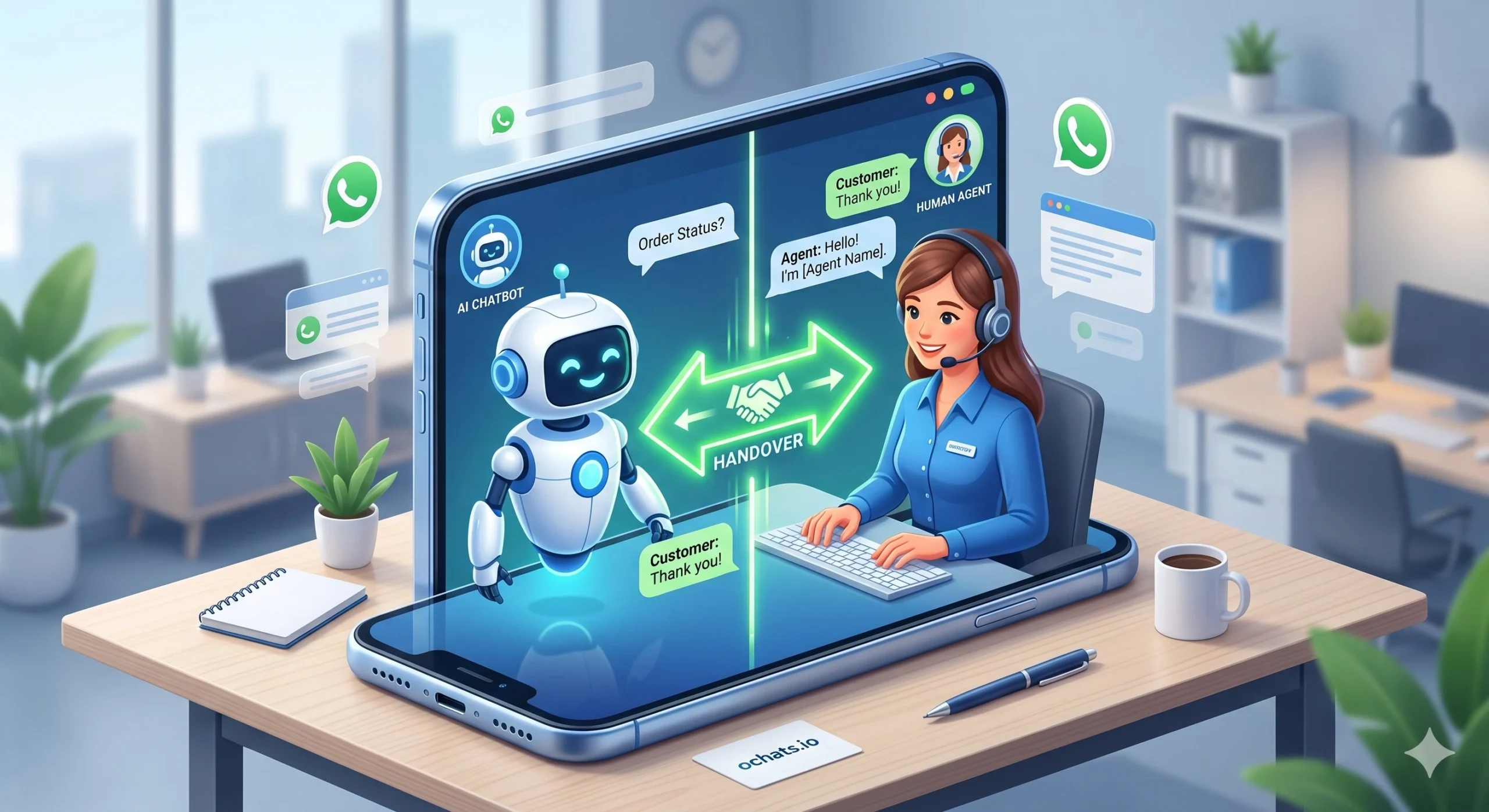
As you expand your WhatsApp for business strategy, you will inevitably face the choice between automating conversations with chatbots or relying on human agents. The most successful customer engagement strategies do not choose one over the other; they expertly blend both.
Understanding when to deploy automation versus when to mandate human intervention is critical for mastering WhatsApp for customer service. Deploying a WhatsApp chatbot for first-line support is incredibly efficient for handling high-volume, low-complexity tasks. This strategic move allows your human agents to focus on high-value interactions while the bot manages the initial triage Chatbots are incredibly efficient at handling high-volume, low-complexity tasks. According to global research, well-designed chatbots can successfully resolve up to 70 percent of routine customer interactions from start to finish without any human involvement.
You should strategically deploy bots for tasks such as:
Answering frequently asked questions (like location, pricing, and operating hours).
Collecting initial lead information (asking for an email address or account number before routing to an agent).
Providing instant order tracking updates based on database triggers.
However, human agents are irreplaceable when empathy, negotiation, and complex problem-solving are required. Human intervention must take over during:
High-stress customer complaints or refund escalations.
Bespoke sales inquiries where a client needs personalized advice.
Technical troubleshooting that falls outside of standard operational procedures.
To achieve this perfect balance, you need seamless handover protocols. A customer should be able to click a single “Talk to an Agent” button to bypass the bot. If you are looking to build this kind of intelligent workflow without touching any code, exploring a No-Code Chatbot Development Tool will give you the precise control you need over your automated architecture.
Tracking WhatsApp Customer Support Performance
You cannot improve what you do not measure. To truly harness the power of WhatsApp for business, you must treat it like any other serious enterprise communication channel and track your performance metrics rigorously. Relying on guesswork will eventually lead to degraded service quality.
To monitor agent productivity and customer satisfaction accurately, you need to rely on a dedicated WhatsApp CRM. A robust customer relationship management system designed specifically for messaging will track critical key performance indicators automatically.
The three most important metrics you need to track are:
First Response Time (FRT): How long does it take for an agent to send the very first reply after the initial automated greeting? Keeping this number low directly correlates with high customer satisfaction.
Resolution Rate: What percentage of inbound queries are successfully solved on the same day? This indicates the competence of your support staff.
Customer Satisfaction (CSAT): By triggering a quick feedback button at the end of a chat, you can measure how happy the customer was with the interaction. Industry benchmarks suggest aiming for a CSAT score above 80 percent for messaging channels.
By integrating your daily messaging with a powerful WhatsApp CRM, you can generate visual reports, identify bottlenecks in your support funnel, and determine exactly when you need to hire more staff to cover peak traffic hours.
Choosing the Right WhatsApp Customer Support Tool for Your Business
Transitioning your company from using basic personal messaging to a highly optimized, scalable support channel requires the right technology stack. You have seen how vital it is to have a WhatsApp team inbox to unify your staff, how relying on a WhatsApp quick reply strategy saves countless hours, and why tracking data through a native WhatsApp CRM is essential for long-term growth.
The final step in mastering WhatsApp for customer service is consolidating all these features into one seamless platform. You need a system that offers cross-platform compatibility, secure data privacy compliance, and an intuitive interface that your team can learn in minutes.
This is exactly where oChats steps in. As a premier omnichannel messaging platform tailored for ambitious businesses, oChats provides an all-in-one ecosystem for your communication needs. From building automated workflows with interactive buttons to assigning complex support tickets inside a collaborative workspace, oChats ensures your transition to enterprise-grade WhatsApp for business is incredibly smooth.
By centralizing your customer data and empowering your agents with advanced tools, you can consistently provide the immediate, personalized assistance that today’s modern consumers demand. Revolutionize your communication strategy, boost your team’s productivity, and drive sustainable business growth by making oChats your dedicated WhatsApp CRM partner today.