
Limited Time Offer: Enjoy a free 2-month plan when you sign up for the annual plan. Request for your 7-day free trial now.
Omnichannel Inbox Software

Unified Customer Support
Own a customer support system that allows you to manage all business chats on a single platform.
- No credit card required
- Free channel integration
- 7-days free trial
- Free onboarding support

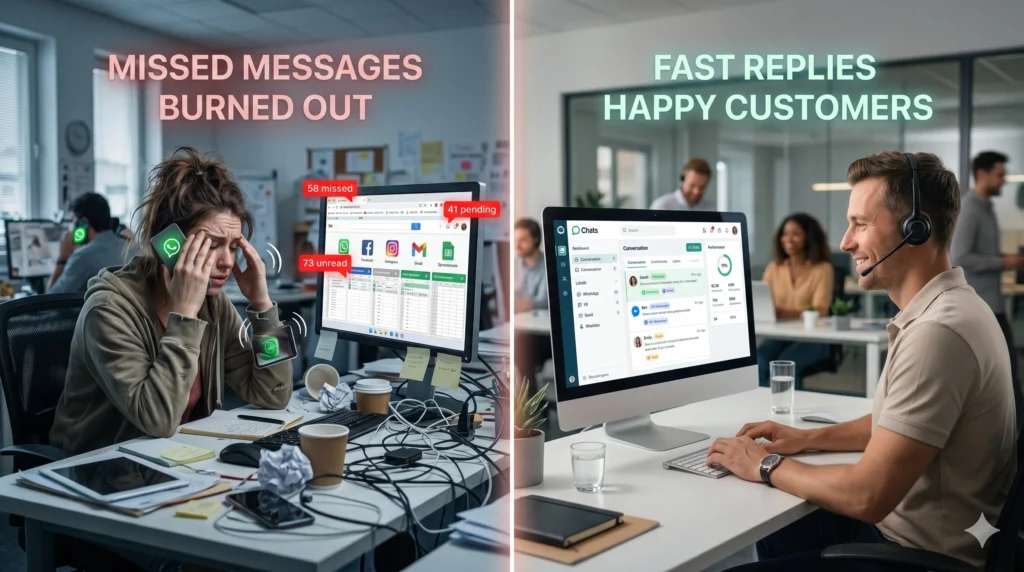
If your customer support team is constantly switching between browser tabs to answer messages on WhatsApp, Facebook, Instagram, and email, you are losing more than just time—you are losing customers. In today’s fast-paced digital landscape, consumers expect lightning-fast replies regardless of the platform they use to contact you.
When your team is forced to juggle multiple devices, share login credentials, or manually track conversations in spreadsheets, the results are inevitable: dropped leads, frustrated customers, duplicated replies, and a burned-out support team.
Welcome to the solution. With oChats’ omnichannel inbox software, you can finally centralize all your communication channels into one powerful, unified workspace. Stop treating customer messaging like a chaotic afterthought and start managing it like the revenue-driving engine it is.
The Chaos of Disconnected Customer Support
As your business grows, the volume of incoming messages scales exponentially. What starts as a manageable trickle of daily inquiries quickly turns into a flood. Suddenly, your current processes begin to break down under the weight of omnichannel demands.
Businesses operating without a centralized omnichannel inbox software typically experience the following critical failures:
The "Shared Phone" Nightmare
Multiple team members trying to answer customer inquiries from a single physical phone dedicated to a WhatsApp Business number. Context is lost, and messages slip through the cracks.
The "Alt-Tab" Fatigue
Support agents constantly switching between the Facebook Meta Business Suite, native Instagram apps, and third-party web chats. This constant context-switching destroys productivity and increases response times.
Lack of Accountability and Ownership
When an angry customer messages your Facebook page, who is responsible for answering? Without a unified inbox, multiple agents might reply simultaneously, or worse, everyone assumes someone else handled it.
Zero Visibility for Management
Managers have no way to track resolution times, monitor agent performance, or step in to handle escalations because conversations are locked away in isolated apps.
If any of this sounds familiar, your business is outgrowing its current tech stack. You need a system that brings the messages to your team, rather than forcing your team to chase down the messages.
What is oChats Omnichannel Inbox Software?
oChats is a comprehensive customer support system built around a powerful omnichannel inbox software. It is designed to aggregate customer conversations from the world’s most popular messaging apps—including WhatsApp, Facebook Messenger, Instagram Direct, Telegram, and more—into a single, clean, and collaborative dashboard.
Rather than logging into five different platforms, your customer success and sales teams log into oChats. Every incoming message is routed into a shared queue where it can be tagged, assigned to specific team members, and resolved with total visibility.
By unifying your customer interactions, oChats bridges the gap between chaotic social media direct messages and structured, professional customer service.
A Tour of the oChats Omnichannel Inbox: All Channels, One View
Most teams understand the concept of a unified inbox in theory. But the real question is: what does it actually look like to sit down and use one? The oChats omnichannel inbox software is built around a three-panel workspace that puts everything your agents need on a single screen, no tab-switching, no app-hopping, no context loss.
The Conversation List Panel
On the left side of the inbox, every active and pending conversation is displayed in a prioritised list, regardless of which channel it originated from. Each conversation card shows the customer's name, the channel icon (WhatsApp, Facebook Messenger, Instagram, Telegram, email, and more), the time of the last message, and a real-time SLA countdown timer. Conversations are colour-coded by urgency: green for healthy, amber for approaching breach, and red for SLA violations that require immediate attention. Agents can filter the list by channel, status (Open, Pending, Resolved), assigned agent, or team making it effortless to isolate your active workload from the broader queue.
The Conversation Thread Panel
The centre panel displays the complete conversation thread in chronological order. What makes this powerful is that the thread is not siloed by channel, if the same customer contacts you on WhatsApp today and Instagram tomorrow, the entire timeline appears in one unified thread. Agents can see the full history, reply directly from the input bar (their response is delivered natively to the customer's chosen channel), attach media, send canned responses, and leave private internal notes, all without leaving the panel. When another agent is actively typing a reply to the same conversation, a real-time typing indicator appears, preventing duplicate responses before they happen.
The Contact and Context Panel
The right-hand panel surfaces the customer's profile the moment a conversation is opened. This includes contact details, custom fields your team has configured, conversation tags, the assigned agent, and a summary of all previous interactions across every channel. This context panel ensures that no agent ever has to ask a customer to repeat information they have already shared, a leading cause of poor customer satisfaction scores.
Inbox Filters, Search, and Bulk Actions
The oChats omnichannel inbox supports full-text search across all conversation history, enabling agents to surface any past interaction in seconds. Supervisors can apply bulk actions, such as reassigning a batch of conversations when an agent goes offline, or closing all resolved tickets from a promotional campaign directly from the conversation list without opening each thread individually.
Core Features of the oChats Customer Support System
Our platform isn’t just about putting messages in one place; it is about equipping your team with the tools they need to resolve tickets faster, close deals, and delight customers.
The Ultimate WhatsApp Shared Inbox
WhatsApp is the preferred communication channel for billions of users worldwide, but the native WhatsApp Business app is not built for teams. With oChats’ official API integration, your entire team can operate from a single WhatsApp Business number. No more passing a physical phone around the office. Multiple agents can log in from their own desktops, view the same WhatsApp queue, and respond to customers simultaneously without interfering with one another.
Facebook Messenger & Instagram DM Unification
Marketing campaigns run on Meta properties generate massive amounts of conversational traffic. oChats pulls every Facebook comment, Messenger inquiry, and Instagram DM into your centralized dashboard. Never lose a high-intent buyer because their message was buried in a hidden "Message Requests" folder on Instagram again.
Intelligent Ticket Assignment and Routing
Stop the collision of multiple agents answering the same customer. oChats omnichannel inbox software features smart routing. Incoming conversations can be automatically assigned to specific agents based on their workload, department, or language proficiency. Once an agent claims a chat, it is locked to them, providing clear ownership and eliminating duplicate responses.
Seamless Internal Team Collaboration
Sometimes, a customer question requires input from the billing department, or a sales rep needs approval from a manager. Instead of taking the conversation to Slack or email, oChats allows agents to leave internal, private notes directly inside the customer’s chat thread. You can tag teammates using "@mentions" to bring them into the loop instantly, ensuring the customer receives a single, accurate answer.
Canned Responses and Automation Workflows
Typing the same answer to the same shipping query fifty times a day is a waste of human talent. oChats allows you to build a library of rich canned responses (quick replies) that agents can deploy with a single click. Furthermore, you can build automated greeting flows and basic chatbot routing to qualify leads before a human agent ever has to step in.
Join 1000+ successful organizations
Trusted by brands





Time Saved
Resolution Time
Response Time
NPS Score
1 messaging platform for marketing, sales, support & engineering
Message Module
1 contact, 1 story
1 contact contains every message, email, web chat & internal discussion. All functionalities are built for you to manage your story well.
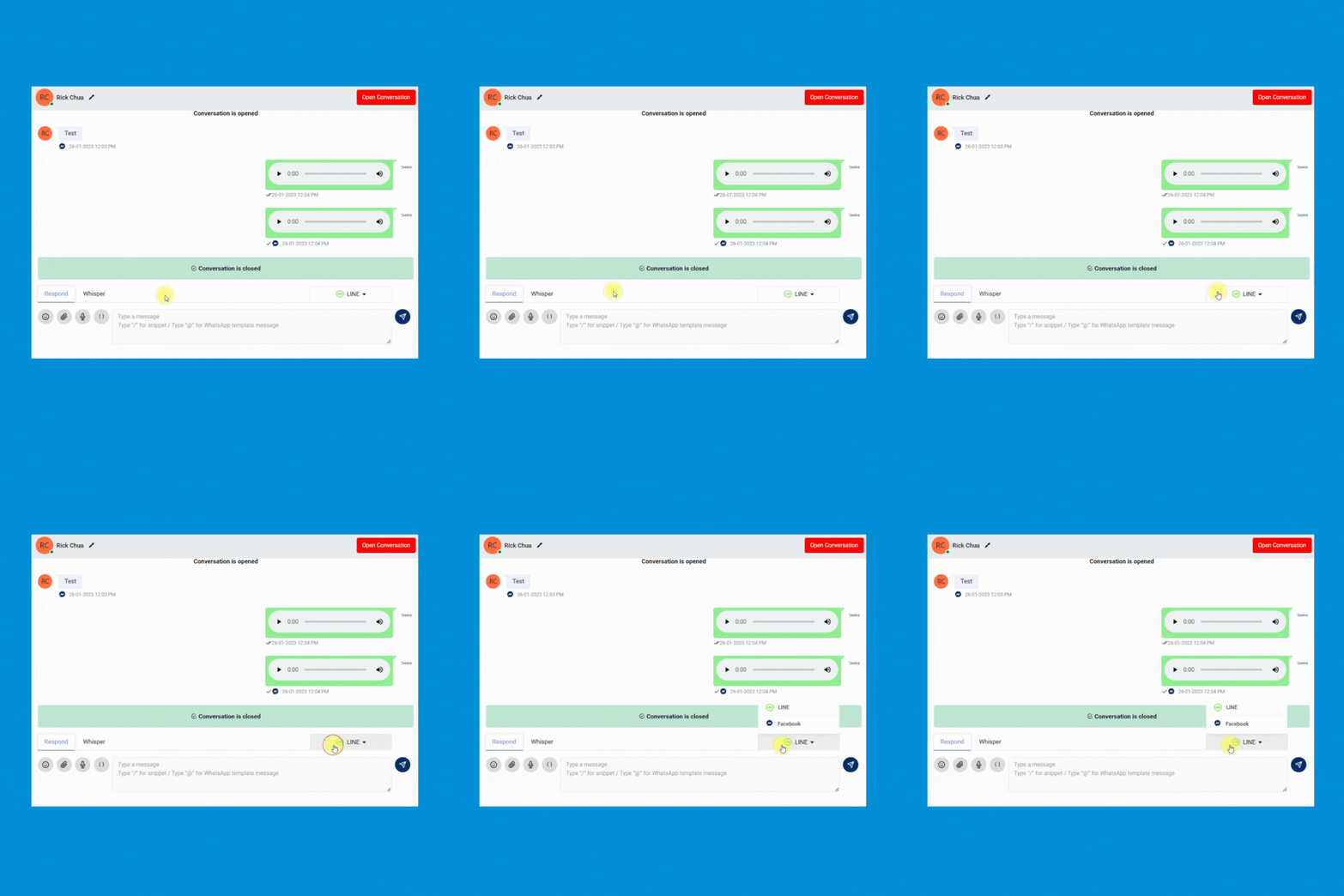
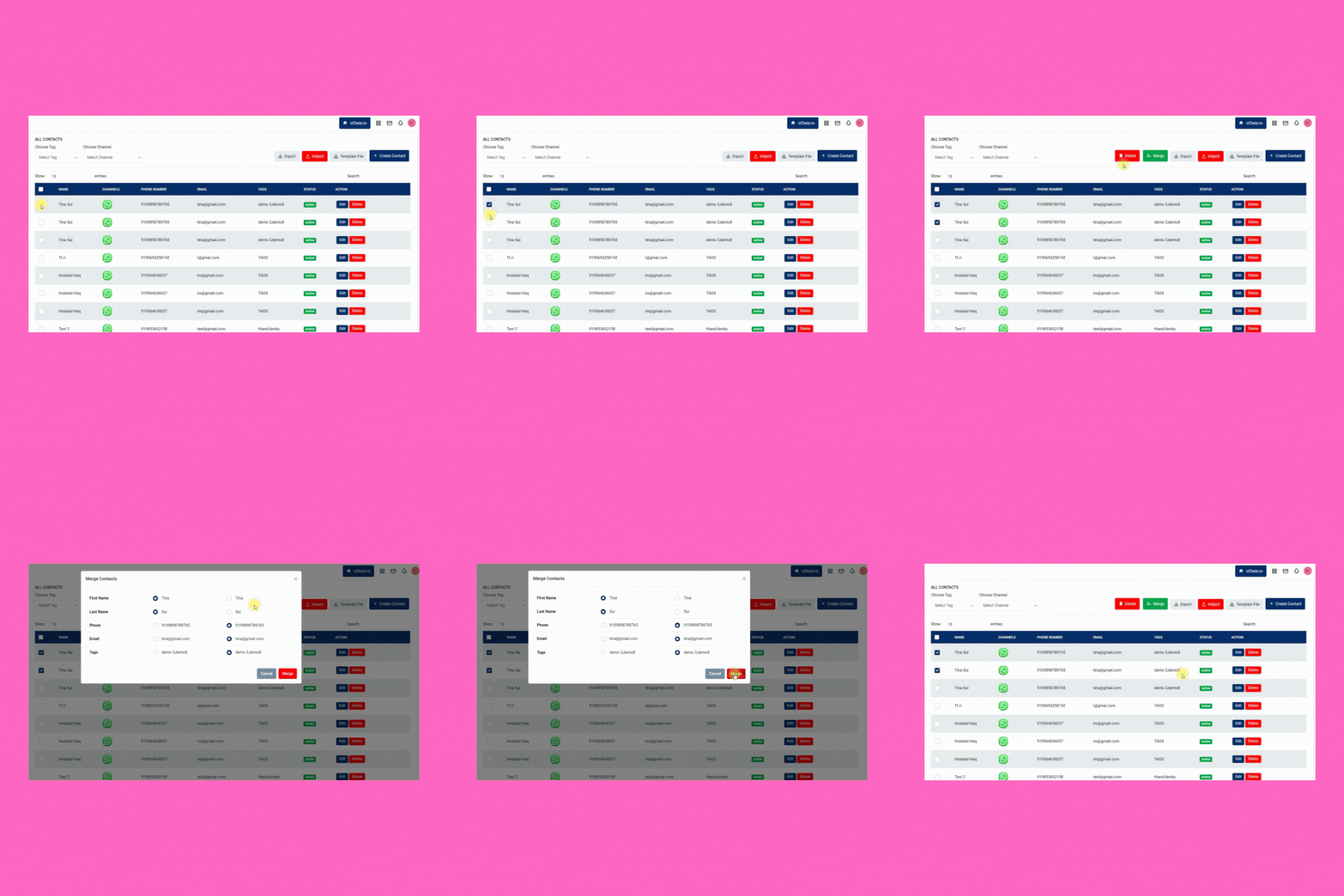
Merge contact
Merge the same contact across different messaging apps for better management. Keeping every contact clean and organized.
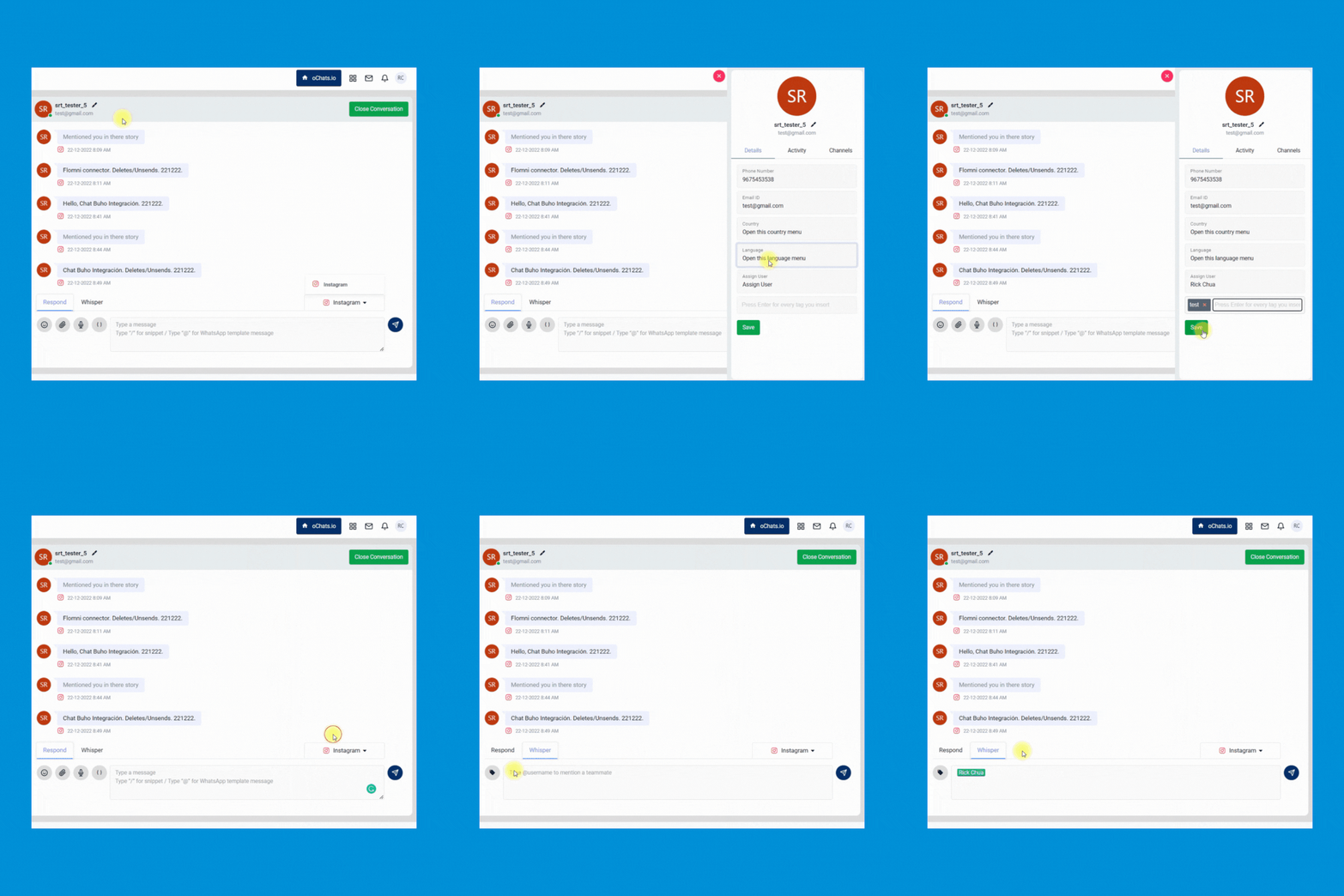
Transfer a conversation to another team member
Enable your team to quickly transfer the conversation from 1 person to another and leave an internal note for reference purposes.
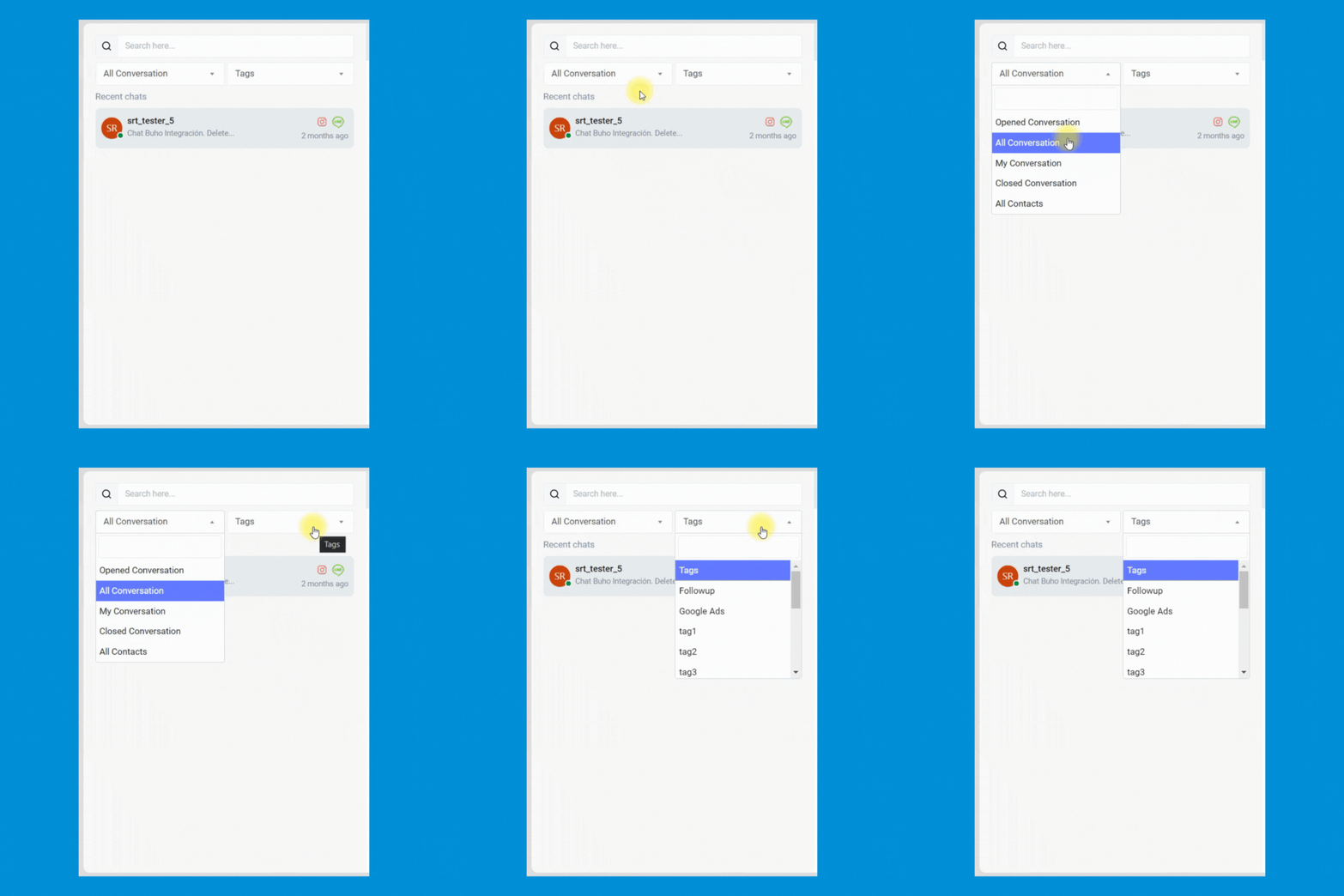
Add a custom tag
Manage every contact easily by inserting custom tags. Never miss any follow-up anymore.
Broadcast Module
Broadcast messages with 100% delivery rate
Send PROMOTIONAL MESSAGES with WhatsApp API provides a 100% delivery rate & instantaneous delivery.
Create marketing campaign
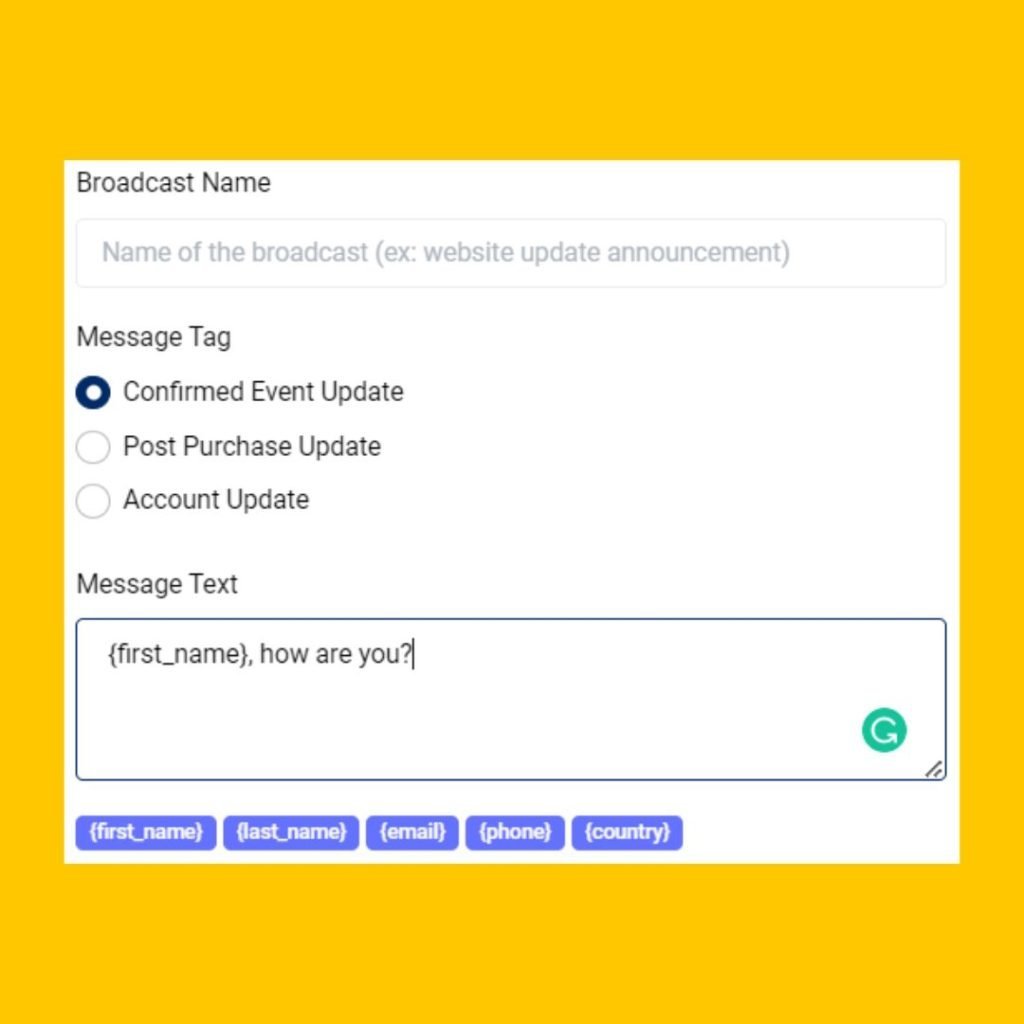
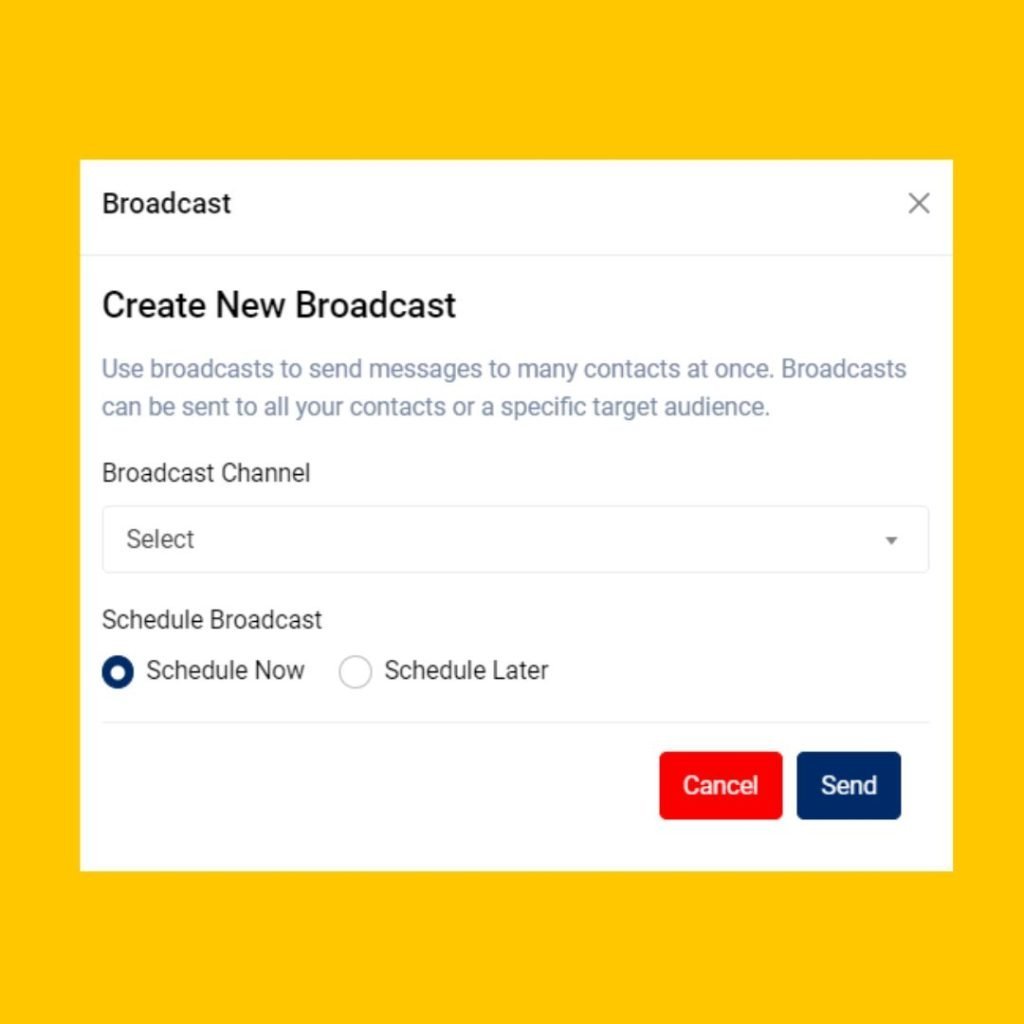
Enable your team to launch and schedule any marketing easily. Your team can even include the button in the WhatsApp message to improve the clickthrough rate of your marketing campaign.
Personalized broadcast
Allow your team to send personalized marketing messages to increase marketing engagement.
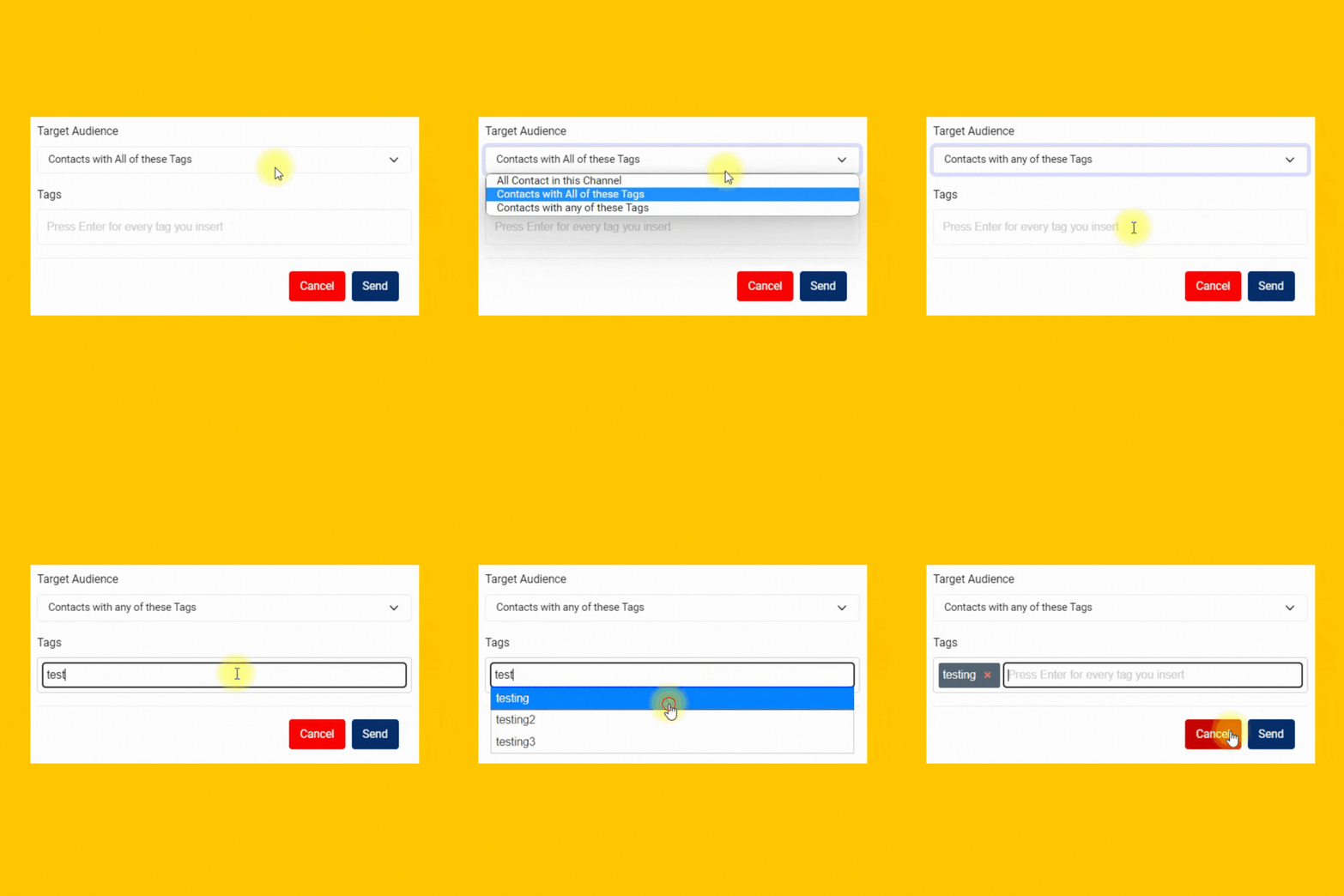
Reach right people
Send highly personalized messages to targeted prospects and customers to the right messaging app.
Optimize by channel
Leverage the unique traits of each channel. Make the most of every message with features like mixed media, templates and tags.
Workspace Module
1 Platform, Unlimited Companies
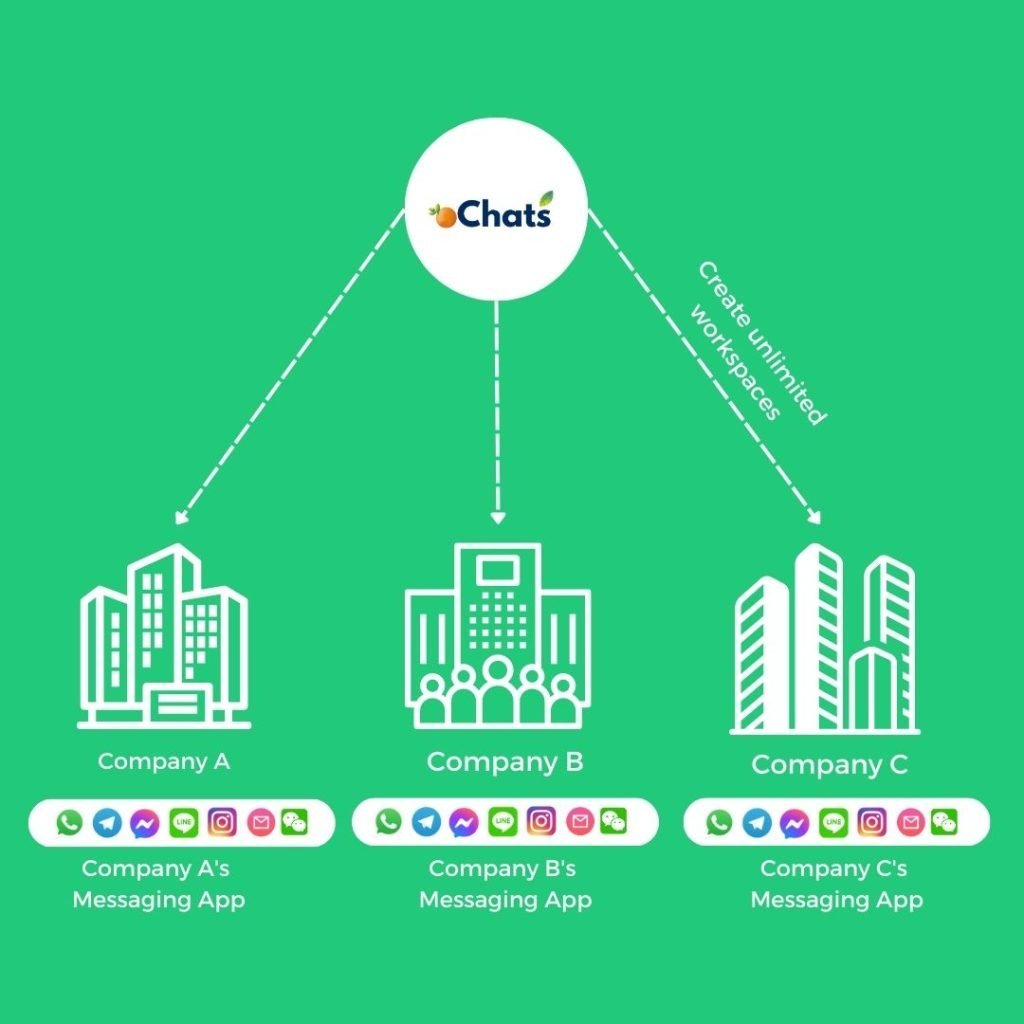
Manage all incoming messages under your companies and brands using a single platform.
Managing all companies can be very expensive. We believe in providing real value to all businesses at an affordable rate. That’s why we have decided to provide unlimited workspaces for any businesses to manage all companies in 1 platform. Super convenient!
Don’t worry! Every workspace has its own unique contact module, message module, user permission module and more.
Contacts Module
1 Platform, Unlimited Contacts From Different Messaging Apps
Never worry about expensive charges because of the high volume of contacts.
Contact channels
Every contact will be saved with the source of channels it comes from. Everything will be properly documented for your convenience.
Merge contacts
2 conversations of the same person from different messaging apps can be merged so your team can have an organized conversation and contact information from 1 person.
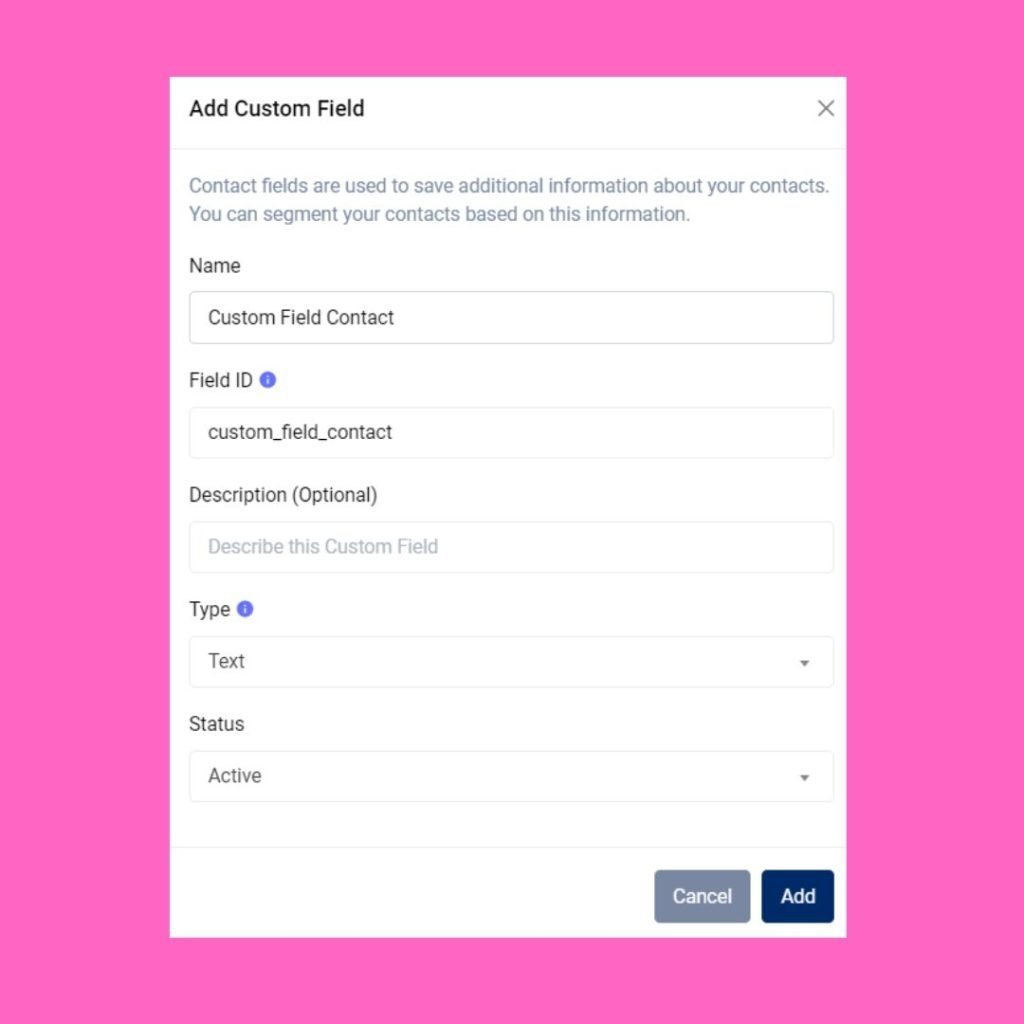
Custom contacts field
Create any contact field easily. Having a custom contact book designed specifically only for you.
Workflow Module
Autoreply messages with workflow automation
Build a rule-based CHATBOT to free up your team’s time

Menu-based chatbot
Build a 24/7 chatbot by using automated rules created within workflow automation.
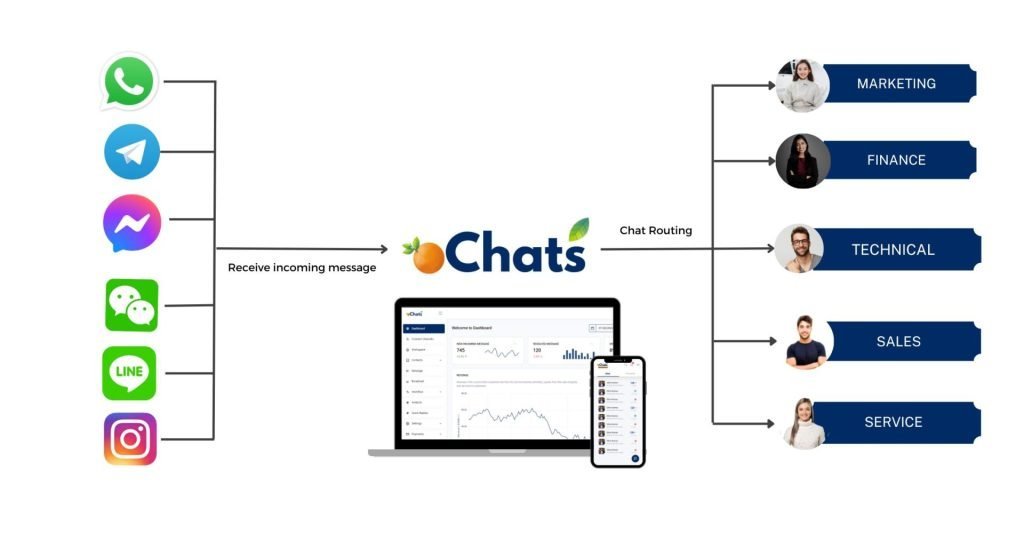
Chat routing
Route every conversation to correct pre-assigned team members efficiently & accurately.
Tag contact automatically
Tag every contact with a specific tag. These tags can be used for filtering all conversations easier in the Contact module.
Qualify leads automatically
Stop wasting time to qualify your leads one by one. Automate it by using workflow automation.

Admin Module
Supervisor Dashboard with Helicopter View
Save your time juggling from 1 messaging app after another. Have a Helicopter View with oChats.io.
Analyse all conversations
Gain long-view perspectives on team, conversation and overall messaging performance. On a single page, learn which Users are exceeding expectations, conversation response and resolution time trends.
Determine user permission
Assign unique permission for every team member by giving permission access on certain modules only.
Full control over everything
Having a full control on every team member's access has never been easier before. Revoke their access if user has resigned from your company.
Inbox Workflow Rules and Team Assignment Engine
A shared inbox without structured assignment rules is just organised chaos. oChats includes a full assignment and workflow engine built directly into the omnichannel inbox software, giving team leads the ability to define exactly how every incoming conversation is handled automatically, without requiring manual intervention for every new ticket.
Manual and Automatic Assignment
Every conversation that enters the inbox can be assigned in one of two ways. With manual assignment, supervisors or agents with the appropriate permissions can claim or reassign conversations directly from the conversation card. With automatic assignment, oChats applies your pre-configured routing rules the moment a new message arrives. You choose the logic: round-robin distribution (conversations are distributed evenly across all available agents), skill-based routing (conversations are directed to agents with the relevant language, product knowledge, or department expertise), or workload-based capping (once an agent reaches their maximum active conversation limit, new conversations bypass them until their queue clears).
Department Queues and Team Segmentation
For businesses operating multiple departments sales, billing, technical support, post-sales, oChats allows you to segment your inbox into dedicated team queues. A customer messaging about a payment issue is routed to the billing team queue. A pre-sales inquiry from Instagram routes to the sales team. Each team sees only the conversations relevant to their function, reducing noise and ensuring that every ticket reaches someone equipped to resolve it on the first touch.
Agent Availability and Conversation Ownership Transfer
Agents can set their availability status Online, Busy, or Away directly within the inbox. When an agent goes offline, their open conversations can be automatically redistributed to available teammates based on your routing rules. Conversation ownership transfer is equally seamless: a supervisor can reassign any open ticket with a single click, and the receiving agent inherits the full conversation history and context immediately.
Custom Automation Workflows
Beyond assignment, oChats' workflow engine allows you to build trigger-based automation that operates continuously inside the inbox. Common examples include: automatically tagging a conversation as "VIP" when a customer's contact profile matches a specific segment, sending a holding message when a new ticket arrives outside business hours, or changing a conversation's status to "Pending" when an agent has replied and is awaiting a customer response. These automations remove repetitive manual steps from your team's workflow, freeing agents to focus on resolution rather than administration.
Connect All Messaging Apps in 1 Platform
Never miss any lead anymore

1 Messaging Platform & Access By Everyone
No more switching between teams, and messaging apps.
All Channels, 1 Platform.
Bringing all messaging benefits to you
Suitable for marketing, sales, support & engineering department

Broadcast Messages & Start Conversations
Send promotional updates, shipping updates, delivery reminders, payment reminders and other notifications on WhatsApp using our API’s
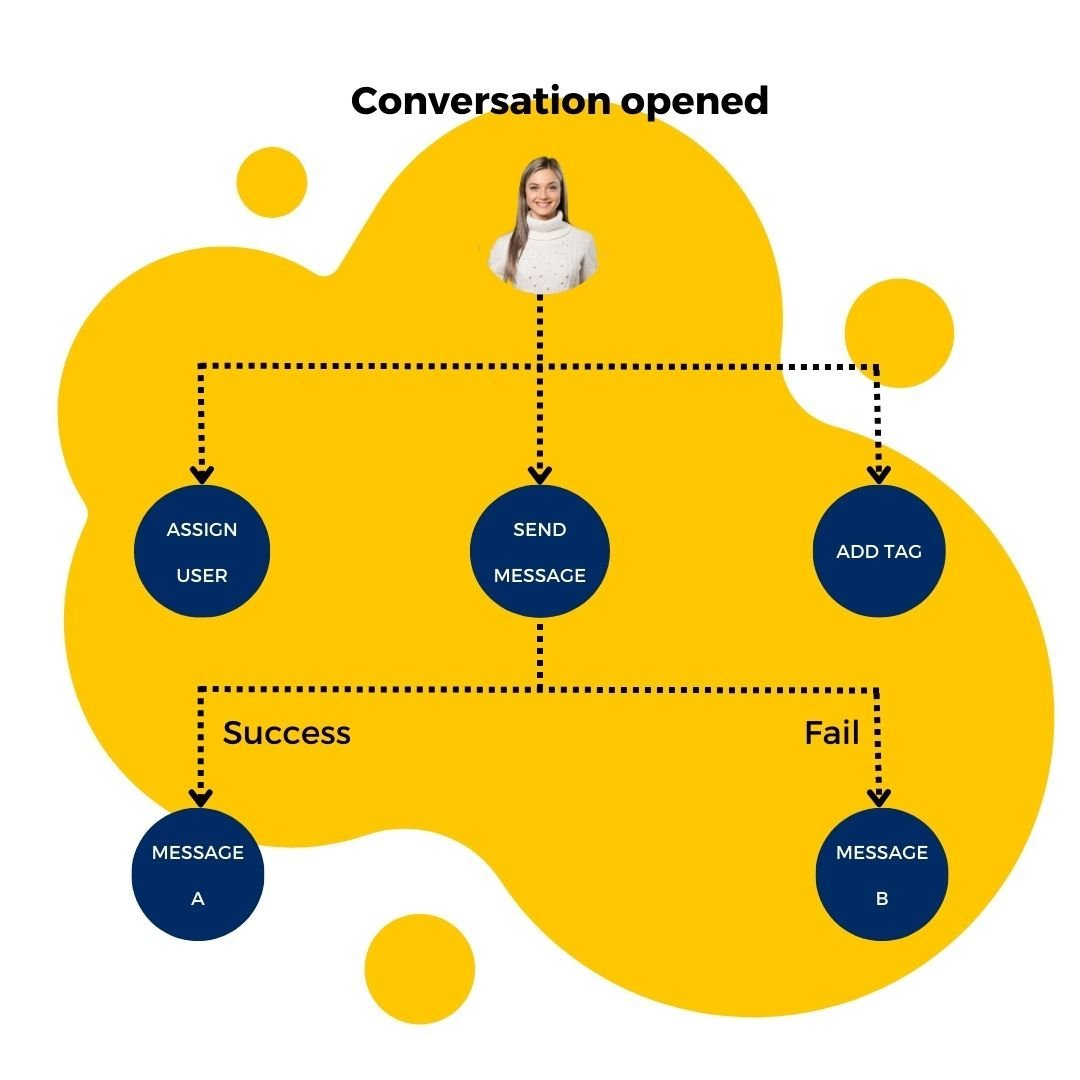
Automate all incoming inquiries with autoreply message
Autoreply all incoming messages with a proper workflow and create a great engagement rate in the process.

Manage all communication channels in 1 platform
Integrate all your business communication channels with oChats software. Then, you can manage all incoming and outgoing chat messages in 1 platform.
The Business Benefits of a Unified Inbox
Transitioning to an omnichannel inbox software is not just an IT upgrade; it is a strategic business decision that directly impacts your bottom line.
Drastically Reduce First Response Time (FRT)
Speed is everything in modern commerce. By removing the friction of app-switching, agents can reply to leads in seconds, significantly increasing conversion rates.
Improve Customer Satisfaction (CSAT)
Customers hate repeating themselves. Because oChats maintains a complete conversational history across all integrated channels, your agents always have context. If a customer messages on WhatsApp today and Instagram tomorrow, the agent sees the entire timeline.
Scale Your Support Operation Without Bloat
You do not need to hire double the staff to handle double the message volume. By utilizing shared inboxes, automation, and quick replies, your existing team can handle significantly more tickets with less stress.
Protect Your Business Data
When employees use personal phones to handle WhatsApp support, your business data walks out the door when they quit. oChats ensures all customer data, leads, and chat histories remain securely owned by your company.
Simple & Straightforward Sign Up Process
Customer Support System
Sign Up / Subscribe
Navigate to the oChats portal to register for a new account or initiate a free trial.
Connect to Channels (Integration)
Head to the channel integration module to sync your preferred communication platforms.
Upload Contacts
Import your existing customer databases, leads, or opt-in contact lists directly into the CRM to prepare for direct messaging and broadcast campaigns.
Invite Team Members
Add team members or multiple agents, assigning appropriate roles and permissions to manage incoming chats.
Start Chatting
With your channels connected and contacts loaded, your unified inbox is active. You can now receive incoming inquiries, route chats to team members, and manage multi-channel conversations entirely from a single platform.
Let's Go To The Future
What happens after you adopt this structure?

Manage everything at scale
You can invite any number of employees to manage and reply to thousands of inquiries at scale easily. No more missing out on any potential leads which could contribute to your actual sales!
- No credit card required
- Free channel integration
- 7-days free trial
- Free onboarding support
Sync Across Device
Available in iOS & Android
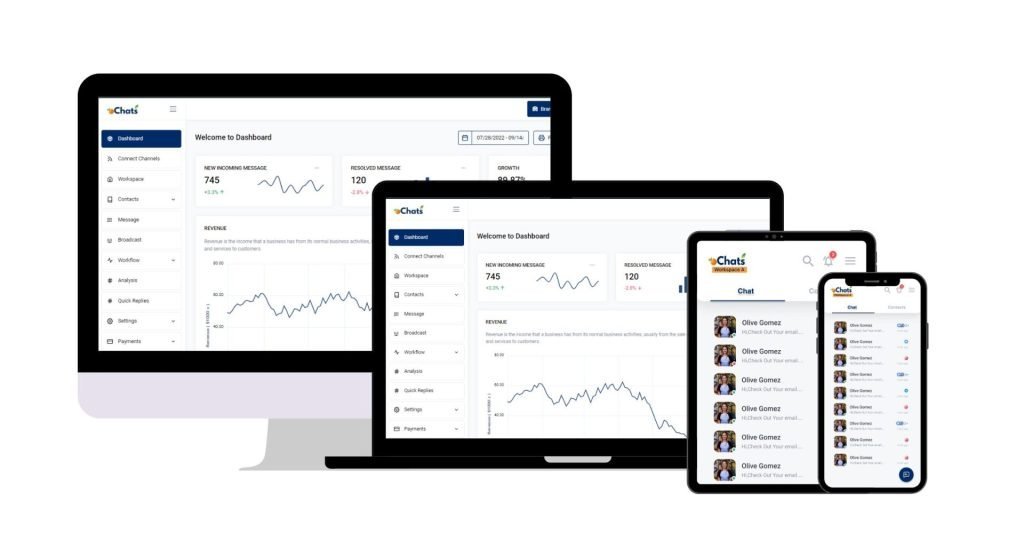
Reply on-the-go
Now you can reply to your business messages at anytime and anywhere. Download mobile app now.
Download mobile app now


Enterprise Security Protection
Your data hosts at Amazon Web Service
Data Secured
Your data is secured by AWS data protection protocol. AWS data protection services provide encryption and key management and threat detection that continuously monitors and protects your accounts and workloads.
AWS Threat Detection & Continuous Monitoring
AWS identifies threats by continuously monitoring the network activity and account behavior that might harm your data
AWS Compliance & Data Privacy
AWS gives you a comprehensive view of your compliance status and continuously monitors your environment using automated compliance checks based on the AWS best practices and industry standards your organization follows.
SSL Encryption
oChats data is encrypted both when it is sent to and from our servers as well as it rests.
Permission Access
oChats lets you decide who can access to your platform. You can also assign the level of access a person can access
Watch oChats.io In Action
Video demo
Frequent Asked Questions
This is the most common pain point for scaling businesses. Relying on personal phones or sharing a single device for WhatsApp Business simply does not scale; it creates a massive blind spot for management and frustrates customers when messages are dropped.
The fix is transitioning to an official API-backed omnichannel inbox software like oChats. By connecting your WhatsApp number to our system, your entire team can access the same inbox from their individual computers. All conversational history is saved in the cloud, management has full visibility, and no one ever has to use a personal device for customer support again.
You are right to be skeptical—many tools claim to be “omnichannel support software” but are merely clunky aggregators that crash under high volume or fail to sync properly with Meta’s ecosystem.
oChats is specifically engineered to handle the “Big Three” (WhatsApp, Facebook Messenger, and Instagram) with deep, stable API integrations. Our system doesn’t just display the messages; it applies helpdesk logic to them. This means you get features like conversation locking, ticket statuses (Open, Pending, Closed), and rich media support natively, ensuring the system holds up even during your busiest sales seasons.
In a standard native messaging app, there is no “collision detection.” Two agents can easily type and send conflicting answers to the same customer, looking highly unprofessional.
Inside oChats, we solve this with Conversation Ownership. When an inquiry lands in the omnichannel inbox, it must be assigned to an agent (either manually or via auto-routing). Once Agent A owns the ticket, Agent B can view it but knows not to interfere. If an agent is typing, the system displays a real-time typing indicator to the rest of the team. This completely eliminates duplicated efforts and embarrassing overlap.
Yes. Reddit users frequently complain that fully automated bots trap customers in endless loops, which ruins the customer experience.
With oChats, you can deploy “hybrid support.” You can set up an initial automated flow to collect the customer’s order number or qualify the lead. Once the bot reaches the end of its script, or if the customer requests a human, the software automatically pauses the bot and flags the conversation as “Requires Human Intervention” in your team’s shared inbox. A live agent can seamlessly take over exactly where the bot left off, reading the entire context before typing a single word.
Absolutely. This is a critical feature missing from native social media apps. If a junior agent receives a complex technical question via Instagram DM, they shouldn’t have to take screenshots and send them to a manager on Slack.
With oChats, the agent can write an internal note directly in the chat timeline, tagging their manager. The note is highlighted in a different color (like yellow) and is completely invisible to the customer. The manager can read the context, leave their advice in another internal note, and the junior agent can then reply to the customer confidently.
Transform Your Customer Support with oChats
Managing customer relationships across multiple platforms doesn’t have to be a stressful, fragmented process. Your customers expect rapid, coherent responses, and your team deserves the right tools to deliver them.
By migrating to an omnichannel inbox software, you are taking a crucial step toward operational efficiency. Stop letting valuable leads slip through the cracks of scattered social media direct messages. Centralize your communication, empower your support agents, and watch your customer satisfaction scores soar.
Ready to bring order to the chaos? Explore the oChats Customer Support System today and unify your WhatsApp, Facebook, Instagram, and more into one beautifully simple workspace.
- No credit card required
- Free channel integration
- 7-days free trial
- Free onboarding support