
Limited Time Offer: Enjoy a free 2-month plan when you sign up for the annual plan. Request for your 7-day free trial now.
Customer Service Management System: Workflow, Teams, SLA, and Escalation Controls

Stop Bouncing Between Tabs. Start Resolving Tickets.
- No credit card required
- Free channel integration
- 7-days free trial
- Free onboarding support

If your team is jumping between email, WhatsApp, and social media just to keep up with customer questions, you are losing valuable time. Worse, your customers are experiencing delayed response times.
Many growing businesses realize that traditional helpdesks are either too complicated, too expensive, or simply ignored by their team because they are frustrating to use. oChats provides a streamlined customer service management system designed for teams that want powerful automation and multi-channel support without the steep learning curve.
Join 1000+ successful organizations
Trusted by brands


The Management Layer That Runs Your Support Operation
Looking for a full platform overview? Visit our omnichannel support software page for a complete breakdown of every channel and feature oChats supports. This page focuses specifically on the management layer inside oChats: the workflow rules, team assignments, SLA policies, and escalation logic that give support managers the control and visibility to run a high-performing team at scale.
A customer service management system does more than receive messages. It orchestrates who handles them, in what order, within what time limits, and what happens when something goes wrong. That operational control layer is what separates reactive support teams from ones that consistently deliver fast, consistent, and accountable service.
Core Features Built for Productivity
Unified Shared Inbox
Bring email, live chat, WhatsApp, and social media direct messages into one clean, organized dashboard. No more lost tickets or overlapping replies.
Smart Automation
Eliminate the repetitive "grunt work." Use intelligent routing and automated responses for your most common FAQs, allowing your human agents to focus on complex, high-value conversations.
Frictionless Collaboration
Tag teammates, leave internal notes, and seamlessly hand off conversations without forwarding emails or copying and pasting context.
Actionable Analytics
Track ticket deflection rates, response times, and customer satisfaction (CSAT) scores so you know exactly how your support team is performing.
1 messaging platform for marketing, sales, support & engineering
Message Module
1 contact, 1 story
1 contact contains every message, email, web chat & internal discussion. All functionalities are built for you to manage your story well.
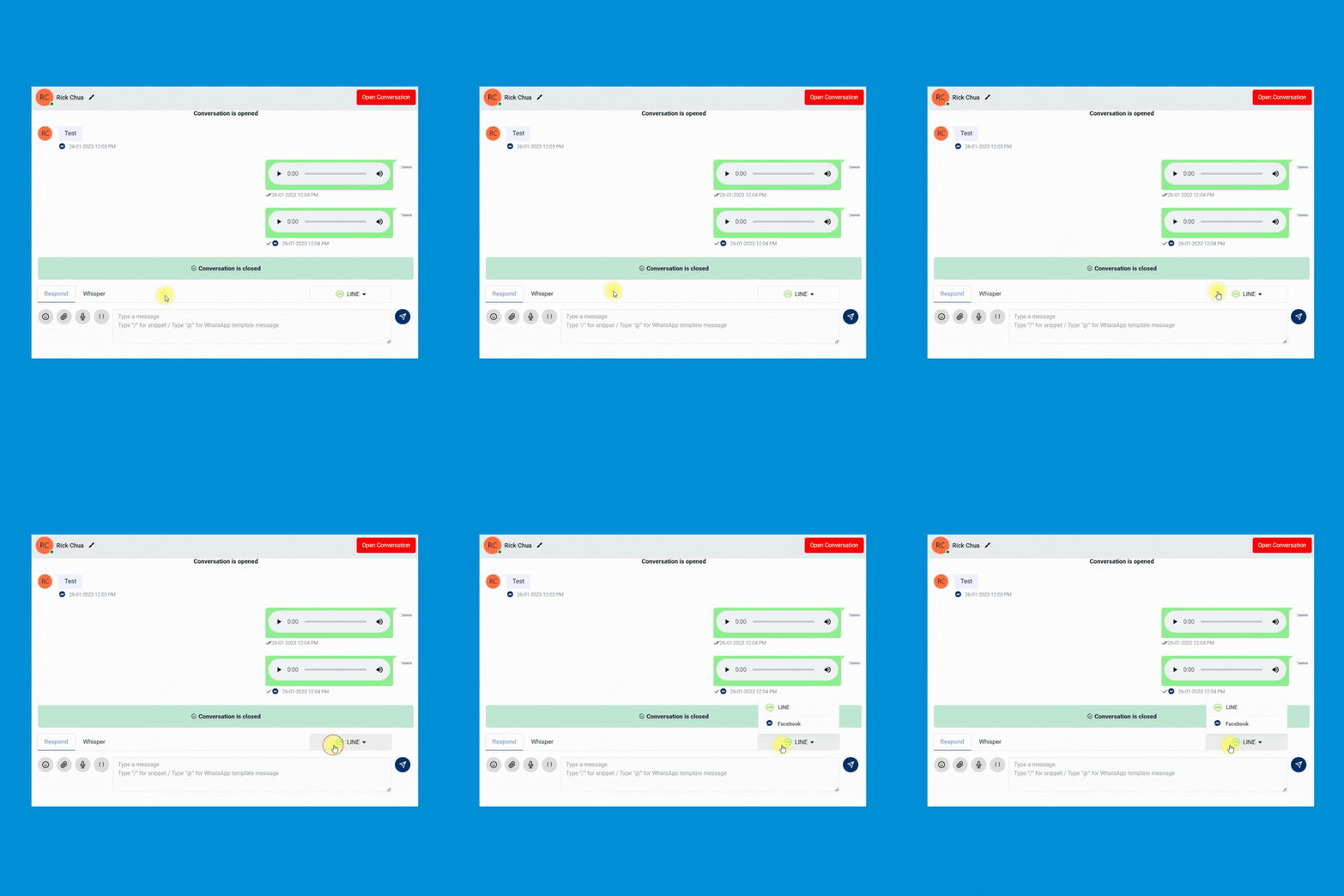
Merge contact
Merge the same contact across different messaging apps for better management. Keeping every contact clean and organized.
Transfer a conversation to another team member
Enable your team to quickly transfer the conversation from 1 person to another and leave an internal note for reference purposes.
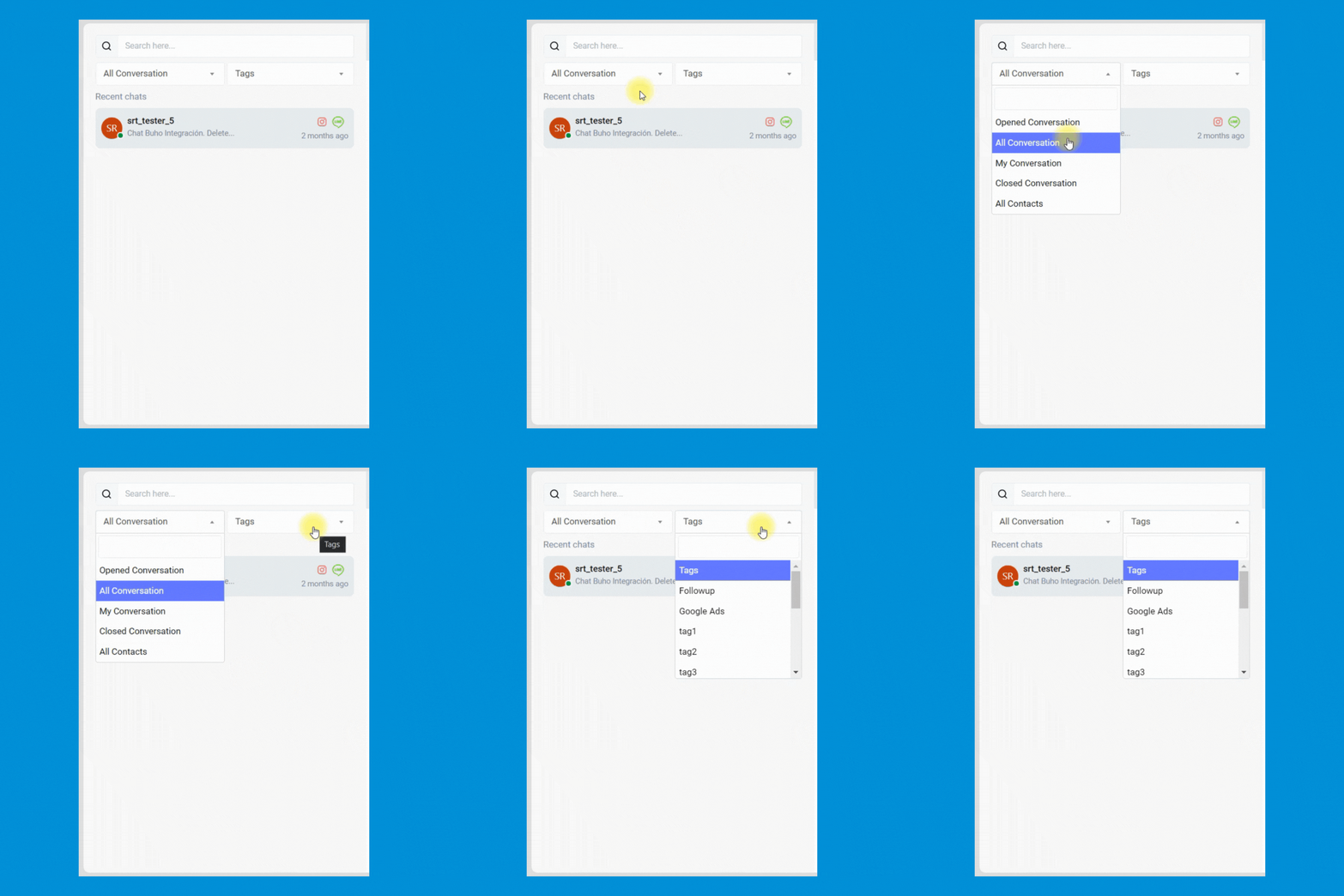
Add a custom tag
Manage every contact easily by inserting custom tags. Never miss any follow-up anymore.


Broadcast Module
Broadcast messages with 100% delivery rate
Send PROMOTIONAL MESSAGES with WhatsApp API provides a 100% delivery rate & instantaneous delivery.
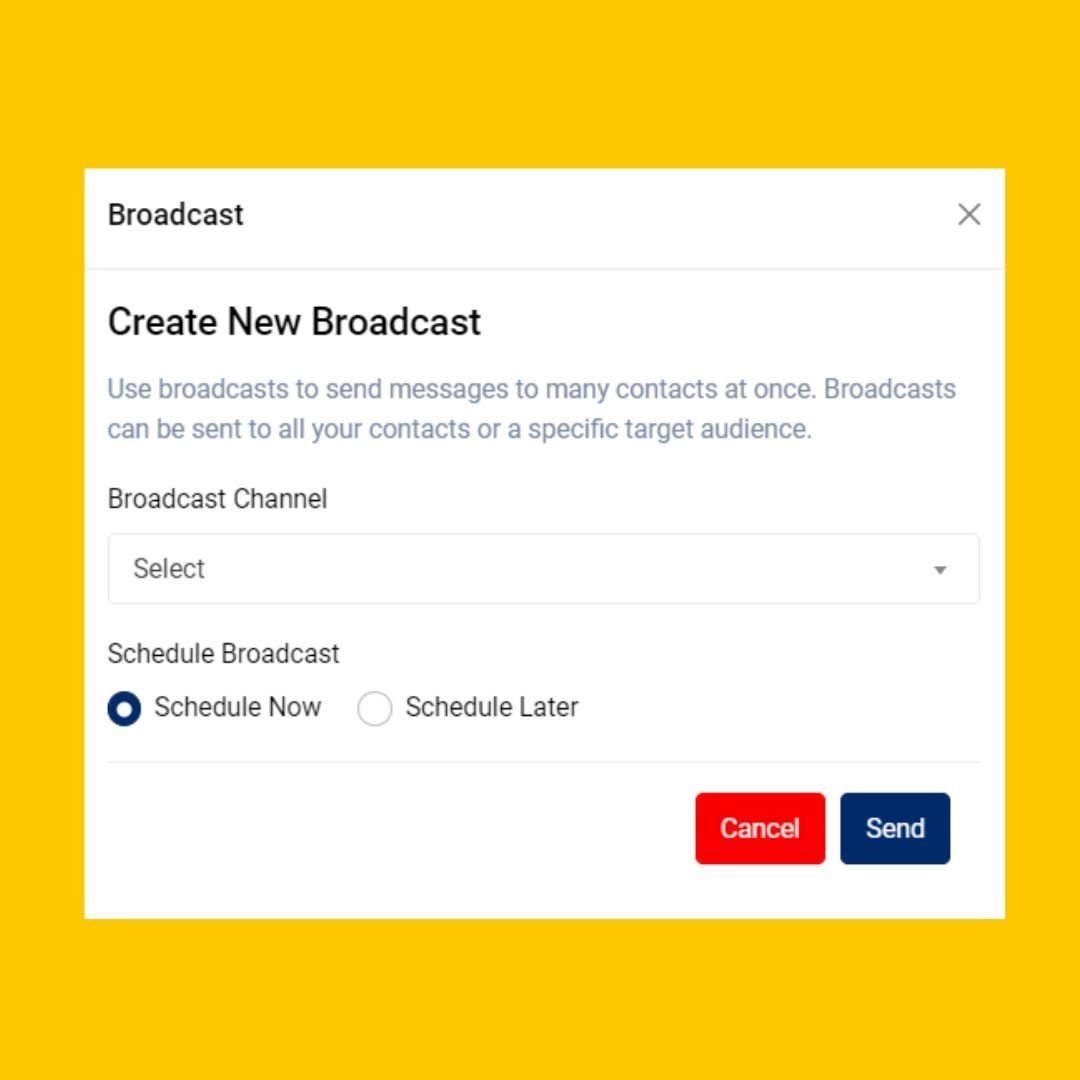
Create marketing campaign
Enable your team to launch and schedule any marketing easily. Your team can even include the button in the WhatsApp message to improve the clickthrough rate of your marketing campaign.
Personalized broadcast
Allow your team to send personalized marketing messages to increase marketing engagement.
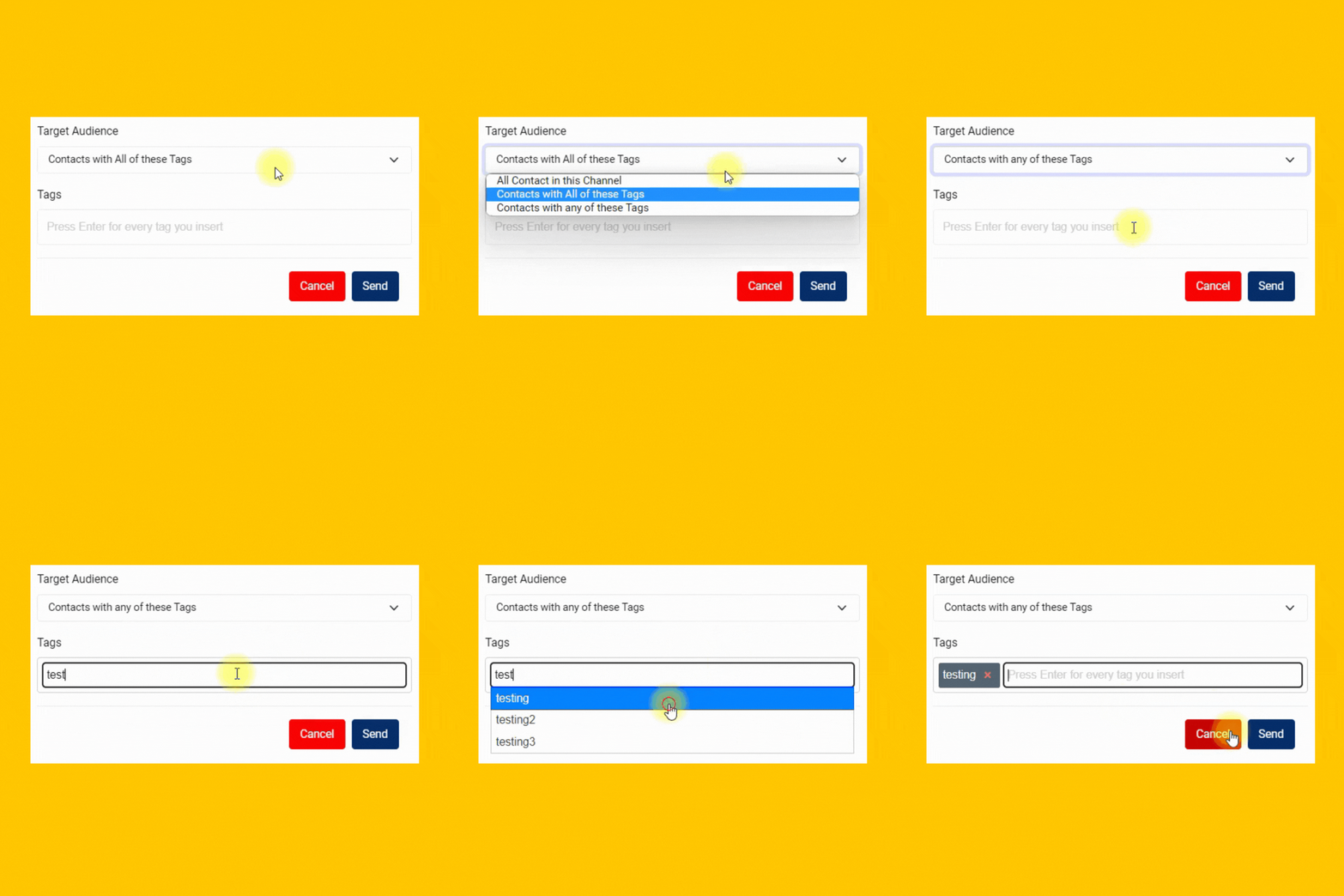
Reach right people
Send highly personalized messages to targeted prospects and customers to the right messaging app.
Optimize by channel
Leverage the unique traits of each channel. Make the most of every message with features like mixed media, templates and tags.
Workspace Module
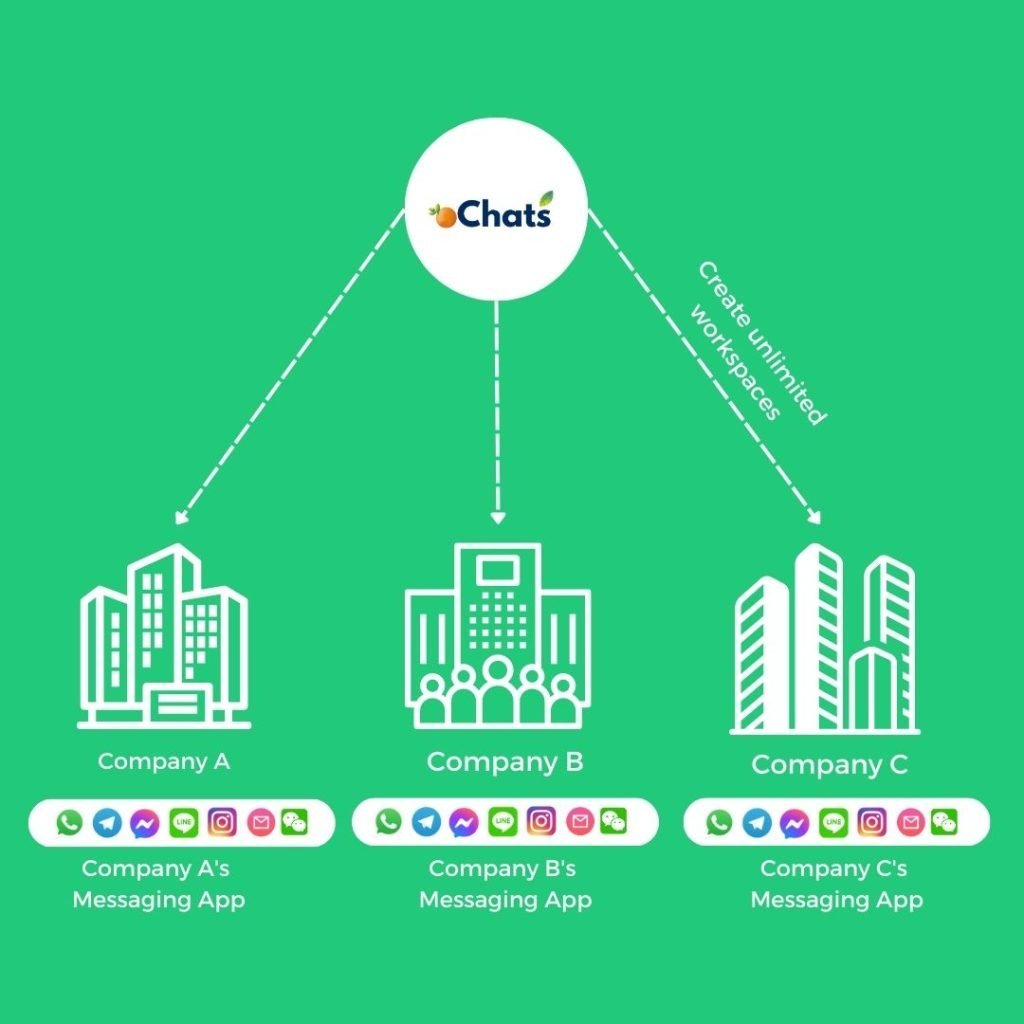
1 Platform, Unlimited Companies
Manage all incoming messages under your companies and brands using a single platform.
Managing all companies can be very expensive. We believe in providing real value to all businesses at an affordable rate. That’s why we have decided to provide unlimited workspaces for any businesses to manage all companies in 1 platform. Super convenient!
Don’t worry! Every workspace has its own unique contact module, message module, user permission module and more.


Contacts Module
1 Platform, Unlimited
Contacts From Different Messaging Apps
Never worry about expensive charges because of the high volume of contacts.
Contact channels
Every contact will be saved with the source of channels it comes from. Everything will be properly documented for your convenience.
Merge contacts
2 conversations of the same person from different messaging apps can be merged so your team can have an organized conversation and contact information from 1 person.
Custom contacts field
Create any contact field easily. Having a custom contact book designed specifically only for you.
Workflow Module
Autoreply messages with workflow automation
Build a rule-based CHATBOT to free up your team’s time

Menu-based chatbot
Build a 24/7 chatbot by using automated rules created within workflow automation.
Chat routing
Route every conversation to correct pre-assigned team members efficiently & accurately.
Tag contact automatically
Tag every contact with a specific tag. These tags can be used for filtering all conversations easier in the Contact module.
Qualify leads automatically
Stop wasting time to qualify your leads one by one. Automate it by using workflow automation.
Admin Module
Supervisor Dashboard with Helicopter View
Save your time juggling from 1 messaging app after another. Have a Helicopter View with oChats.io.
Analyse all conversations
Gain long-view perspectives on team, conversation and overall messaging performance. On a single page, learn which Users are exceeding expectations, conversation response and resolution time trends.
Determine user permission
Assign unique permission for every team member by giving permission access on certain modules only.
Full control over everything
Having a full control on every team member's access has never been easier before. Revoke their access if user has resigned from your company.
Workflow Management for Customer Service Teams
Strong workflow management inside a customer service management system means building repeatable, rule-driven processes so your team spends less time deciding what to do next and more time actually helping customers. oChats lets you define the logic once and let the system enforce it automatically, every time.
Automated Ticket Routing
Set routing rules based on channel, keyword, language, customer tag, or conversation type. When a new conversation arrives, oChats evaluates your conditions and sends it to the right queue or agent instantly. No manual triage. No ambiguity about who handles WhatsApp versus email versus live chat.
Rule-Based Conversation Triggers
Build trigger sequences that fire when specific conditions are met. If a conversation has been sitting in queue for more than 10 minutes, oChats can automatically send a holding reply and flag it for a supervisor. If a customer mentions a word like "refund" or "cancel," the conversation routes directly to your retention team before an agent even has to read it.
Canned Responses and Message Templates
Standardize replies to the most common questions with saved response templates. Agents select the right template in one click, reducing handle time and ensuring every customer gets a consistent, on-brand answer, especially on sensitive topics like pricing, returns, or account changes.
Inbox Views and Queue Management
Create filtered inbox views by team, channel, status, or priority level. Instead of one global inbox where every message competes for attention, each team sees only what is relevant to them. Supervisors get a full queue view to spot bottlenecks before they become delays.
Team Assignments and Role-Based Routing
Unclear ownership is one of the most common reasons support quality breaks down. When any agent can pick up any ticket, the wrong conversations get handled by the wrong people, senior agents waste time on routine queries, and customers end up repeating themselves. oChats solves this with structured team assignments built directly into your customer service management system.
Assign Conversations to Specific Agents or Teams
Manually assign open conversations to a named agent or a team queue. This is useful for VIP customers, complex technical escalations, or requests that require specialist knowledge. Supervisors get a clear view of who owns every open conversation at any moment, eliminating the blind spots that come with shared inboxes handled informally.
Round-Robin and Load-Balanced Distribution
Enable automatic round-robin assignment to distribute incoming conversations evenly across available agents. Load balancing prevents one agent from drowning while others sit idle, keeping response times consistent across your team without a manager needing to intervene. When an agent goes offline, oChats redistributes their queue automatically.
Role Permissions and Visibility Controls
Control what each team member can see and do inside the platform. Agents are scoped to their assigned conversations. Team leads get visibility across their group. Managers get a full cross-team dashboard. Role-based access keeps data organized, prevents agents from accidentally picking up conversations outside their remit, and gives managers the oversight they need without creating noise for everyone else.
Collaborative Handoffs Without the Friction
When a conversation needs to transfer between agents or teams, oChats keeps the full context intact. The receiving agent sees the complete history, internal notes, and any tags the previous agent added. There is no copy-pasting between systems, no forwarding email threads, and no customer having to repeat their issue from the beginning.
SLA Policies That Keep Your Team Accountable
Service Level Agreements define the response and resolution time commitments your team makes to customers. Without enforced SLA policies, response times drift, customer expectations are unmanaged, and it becomes nearly impossible to hold individuals or teams accountable with data. Your customer service management system should track SLA performance automatically and surface breaches before they happen, not after.
First Response Time Targets
Set a maximum time limit for how long a customer waits before receiving a first reply from a human agent. oChats tracks this per conversation and highlights any ticket approaching its deadline. Agents can see at a glance which conversations are most urgent, so no customer sits unanswered while less pressing messages get picked up first.
Resolution Time SLAs by Ticket Type
First response is only one half of the commitment. Resolution SLAs track how long it takes to fully close a ticket from the moment it arrives. You can set different resolution time targets based on ticket category, customer segment, or channel. A billing dispute might carry a 4-hour resolution SLA. A general product question might have a 24-hour window. The system tracks both without any manual effort.
SLA Breach Alerts and Supervisor Notifications
When a ticket is about to breach its SLA threshold, oChats sends an alert to the assigned agent and, optionally, to a supervisor. This early warning system gives your team time to act before the breach occurs, rather than discovering it in an end-of-day report. Fewer SLA breaches mean fewer escalations and fewer frustrated customers.
SLA Performance Reporting
Review SLA compliance over time by agent, team, or ticket category. If one team consistently misses its resolution targets on a particular channel, that is a staffing or process problem you can now see clearly. Data-driven SLA reporting turns vague performance concerns into specific, actionable findings that managers can address directly.
Escalation Rules to Catch Every At-Risk Ticket
Even with structured routing, clear team assignments, and enforced SLA policies, some conversations will still need human intervention outside the normal flow. Escalation rules inside your customer service management system are the safety net that ensures no customer waits indefinitely and no high-risk conversation goes unnoticed by a senior team member.
Time-Based Escalation
Automatically escalate any conversation that has not received a reply within a defined time window. If a ticket has been open for two hours with no agent response, oChats escalates it to a team lead and fires an internal notification. The customer never sees the escalation, but your team is immediately aware and accountable. Escalation timers reset each time a meaningful action is taken on the ticket.
Keyword and Risk-Signal Escalation
Certain messages need attention before an agent even reads them. Configure oChats to detect high-risk language such as legal threats, repeated complaint keywords, or phrases associated with churn risk, and escalate those conversations automatically to a senior agent or manager. Acting early on at-risk signals is far less costly than responding to a formal complaint or a negative public review.
Channel-Specific Escalation Paths
Not all channels carry the same urgency or public visibility. Define separate escalation paths for WhatsApp, live chat, email, and social media. A public social media comment left unanswered for 30 minutes may warrant immediate escalation, while an email inquiry can follow a longer window. Channel-aware escalation rules let you match urgency to the channel your customer is using and the stakes that come with it.
Supervisor Override and Full Audit Trail
When a ticket is escalated, supervisors receive a direct notification and can override the current assignment, add an internal note visible only to the team, or step into the conversation themselves. Every action taken from first contact to resolution is logged in a full audit trail. This protects your team, helps you learn from difficult cases, and gives managers the evidence they need for coaching conversations and process improvements.
Connect All Messaging Apps in 1 Platform
Never miss any lead anymore

1 Messaging Platform & Access By Everyone
No more switching between teams, and messaging apps.
All Channels, 1 Platform.
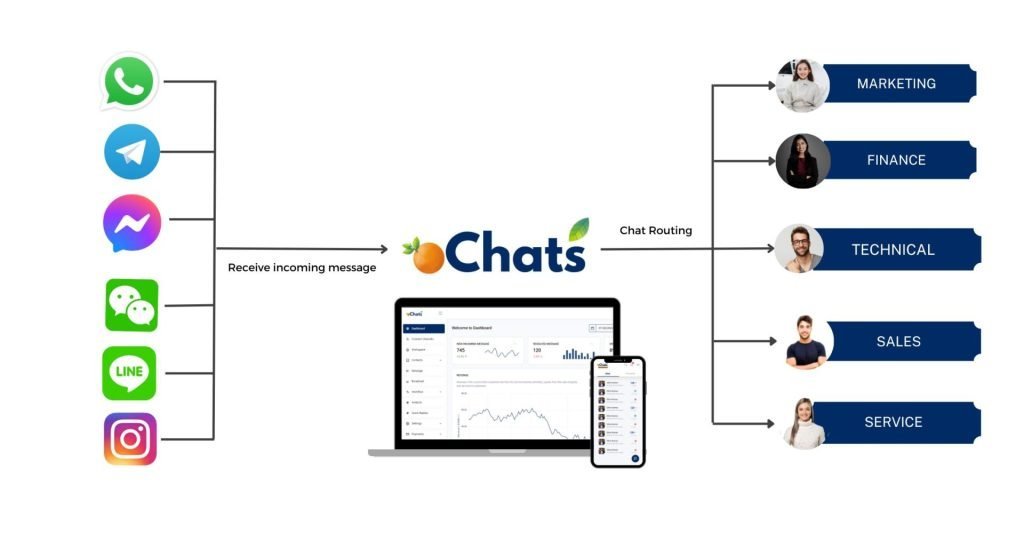
Bringing all messaging benefits to you
Suitable for marketing, sales, support & engineering department

Broadcast Messages & Start Conversations
Send promotional updates, shipping updates, delivery reminders, payment reminders and other notifications on WhatsApp using our API’s
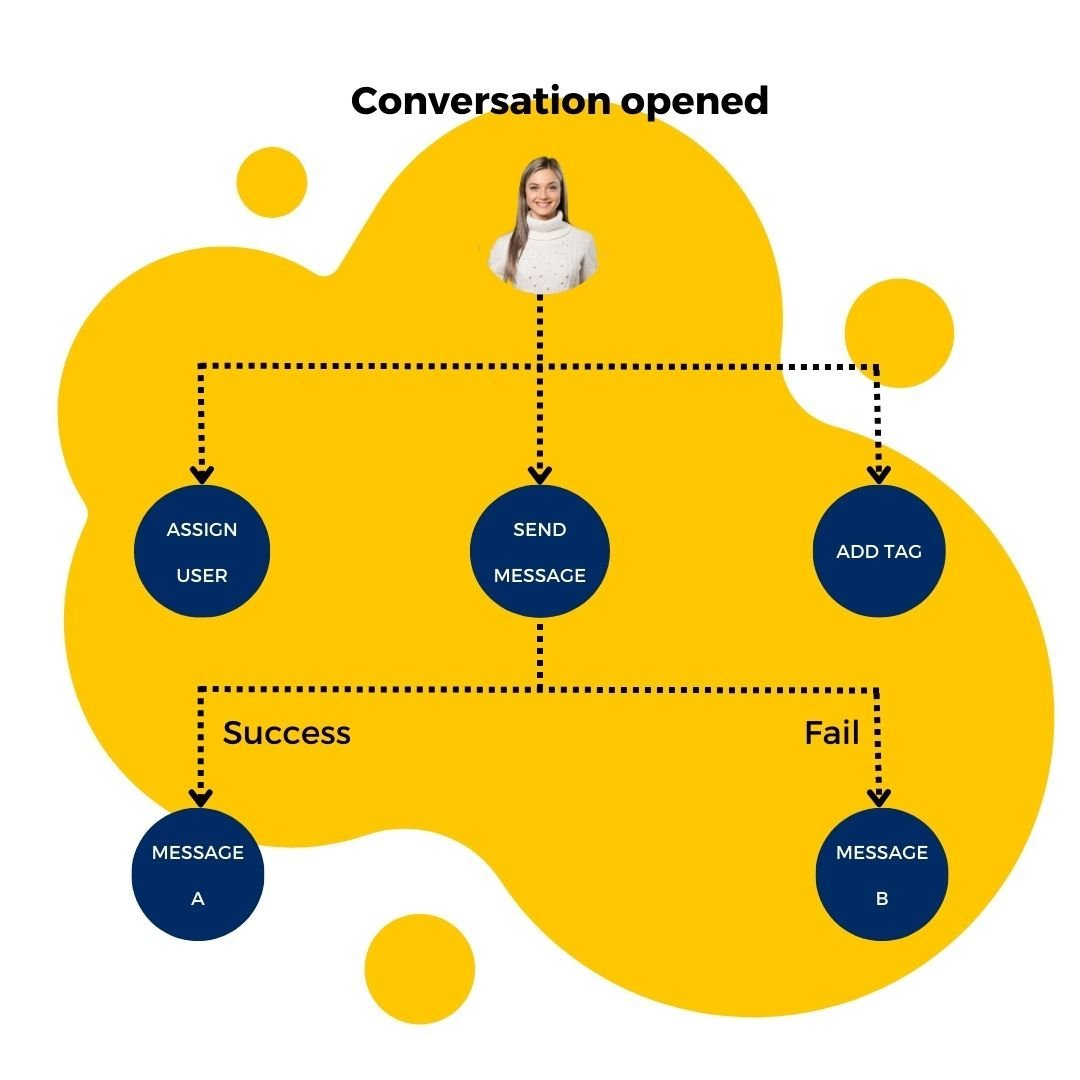
Automate all incoming inquiries with autoreply message
Autoreply all incoming messages with a proper workflow and create a great engagement rate in the process.

Manage all communication channels in 1 platform
Integrate all your business communication channels with oChats software. Then, you can manage all incoming and outgoing chat messages in 1 platform.
Simple & Straightforward Sign Up Process
Customer Service Management System
Subscribe
Sign up an oChats account.
Integration
Connect & integrate to your desired channels from oChats dashboard
Chat
You are ready to go! Start chatting away with your visitors and customers. Manage multiple communication channels in 1 platform.
Let's Go To The Future
What happens after you adopt this structure?

Manage everything at scale
You can invite any number of employees to manage and reply to thousands of inquiries at scale easily. No more missing out on any potential leads which could contribute to your actual sales!
- No credit card required
- Free channel integration
- 7-days free trial
- Free onboarding support
Sync Across Device
Available in iOS & Android
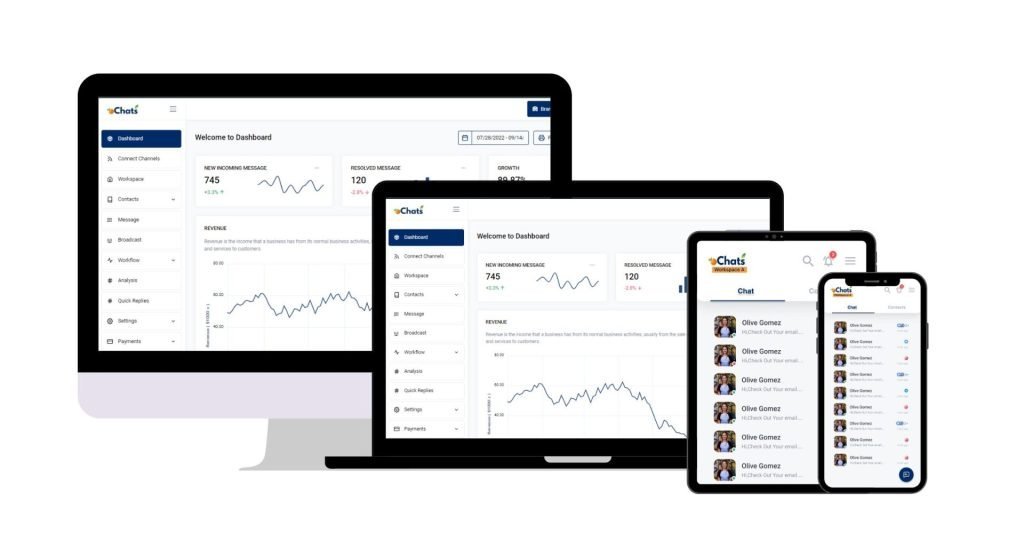
Reply on-the-go
Now you can reply to your business messages at anytime and anywhere. Download mobile app now.
Download mobile app now


Why Teams Choose oChats Over Legacy Helpdesks
A powerful tool is useless if your team refuses to use it. While legacy platforms pile on features you will never use (and charge you for them), oChats focuses on adoption and simplicity.
We built our customer service management system around the philosophy that “simple and used beats powerful and ignored.” You get the exact features you need to scale your support, combined with an interface your team will actually enjoy using every day.

Slash Response Times
Automations and a unified inbox allow your team to reply in seconds, not hours.
Boost Customer Satisfaction (CSAT)
Quick, contextual, and accurate support directly translates to happier customers and higher retention rates.
Scale Without Extra Headcount
By automating routine queries and streamlining workflows, your current team can handle a significantly higher volume of conversations.
Ensure Brand Consistency
Standardize your support messaging across all channels so every customer gets the same high-quality experience.
Built for Every Industry
No matter your business model, seamless communication is the key to growth:
E-Commerce & Retail
Handle order inquiries, process returns, and send shipping updates seamlessly.
Education & Training
Answer student enrollment queries, schedule consultations, and manage course information requests.
Real Estate
Capture leads instantly, schedule property viewings, and send brochures to potential buyers via WhatsApp.
Service Providers
Manage appointment bookings, handle troubleshooting, and provide post-service support efficiently.
Enterprise Security Protection
Your data hosts at Amazon Web Service
Data Secured
Your data is secured by AWS data protection protocol. AWS data protection services provide encryption and key management and threat detection that continuously monitors and protects your accounts and workloads.
AWS Threat Detection & Continuous Monitoring
AWS identifies threats by continuously monitoring the network activity and account behavior that might harm your data
AWS Compliance & Data Privacy
AWS gives you a comprehensive view of your compliance status and continuously monitors your environment using automated compliance checks based on the AWS best practices and industry standards your organization follows.
SSL Encryption
oChats data is encrypted both when it is sent to and from our servers as well as it rests.
Permission Access
oChats lets you decide who can access to your platform. You can also assign the level of access a person can access
Watch oChats.io In Action
Video demo
How the Management Layer Fits Your Omnichannel Support Stack
The features covered on this page, including workflow rules, team assignments, SLA policies, and escalation paths, form the operational management layer inside oChats. This is the layer your managers and team leads interact with to run support at scale: defining the rules, monitoring compliance, and maintaining quality across every conversation your team handles.
This management layer works alongside the broader platform that connects every channel your customers use. To understand how oChats unifies WhatsApp, live chat, email, and social media into a single inbox, and to see the full platform feature set, read our guide to omnichannel support software.
Together, the management layer and the omnichannel platform give your team two things that every scaling support operation needs: the channels to meet customers wherever they are, and the controls to ensure every conversation is handled the right way, by the right person, within the right time frame.
Frequent Asked Questions
Not at all. A common frustration we see is teams overpaying for heavy tools that require weeks of setup. oChats is built specifically to be lightweight and intuitive. You get the essential ticketing and automation features you need without the overwhelming bloat.
Managing channels separately gets messy fast. oChats acts as a single source of truth. Whether a customer emails you, sends a WhatsApp message, or reaches out via live chat, it all feeds into one unified inbox. Your agents reply from oChats, and the message is delivered back to the customer on their preferred platform.
Yes. We understand that customers hate rigid bots that trap them in loops. Our automation is designed to handle routine inquiries (like order updates or simple FAQs) while maintaining a seamless, immediate handoff to a human agent the moment a conversation gets complex.
oChats is designed for rapid deployment. Most teams are up and running, with their channels connected, in less than an hour.
You can find out more from our pricing page. As for WhatsApp template fees, you can refer to WhatsApp official website.
SLA policies in oChats let you set maximum first response times and resolution time targets per ticket type, channel, or customer segment. The system tracks each conversation against these targets in real time, highlights tickets approaching their deadline, and sends alerts to agents and supervisors before a breach occurs. Managers can review SLA compliance reports by agent, team, or category to identify recurring bottlenecks and fix them with data.
Yes. oChats supports channel-specific escalation paths. You can define separate time windows and escalation triggers for WhatsApp, email, live chat, and social media. This lets you match escalation urgency to the expectations of each channel, so a public social media message triggers faster escalation than a standard email inquiry.
This page focuses on the management layer inside oChats: workflow automation, team assignments, SLA policies, and escalation rules. These are the operational controls your managers and team leads use to run support at scale. The omnichannel support software page provides a full overview of the platform, including how oChats unifies every customer channel into one shared inbox.
Round-robin assignment automatically distributes incoming conversations across your available agents in sequence. As each agent reaches capacity or goes offline, new conversations route to the next available team member. This keeps workloads balanced and response times consistent without a manager needing to manually assign every ticket. When combined with SLA tracking, round-robin ensures accountability stays paired with fair distribution.
Ready to Uncomplicate Your Customer Support?
Stop letting messy inboxes and repetitive questions dictate your workday. See the difference a streamlined, modern support tool can make for your team and your customers.
- No credit card required
- Free channel integration
- 7-days free trial
- Free onboarding support